


That initial spark of an app idea is an incredible feeling. But turning that spark into a successful, real-world app takes a clear, strategic process. It’s a journey that unfolds in phases: validating your concept, designing a great user experience, picking the right tech, building and testing, and finally, launching and growing your user base.
It all starts with grounding your brilliant idea in reality.
To give you a bird's-eye view, let's quickly map out the entire journey.
The Core Stages of App Creation
Here is a high-level summary of the entire app development journey, from your initial concept to post-launch growth and beyond. This table breaks down what you're trying to achieve at each stage and what you should have in hand when you're done.
| Stage | Key Objective | Primary Output |
|---|---|---|
| 1. Strategy & Validation | Confirm your idea solves a real problem for a specific audience. | A validated app concept and a clear business plan. |
| 2. UX/UI Design | Map out the user journey and create a visually appealing, intuitive interface. | Wireframes, mockups, and a clickable prototype. |
| 3. Development & Engineering | Write the code that brings the design and features to life. | A functional app (Alpha/Beta version). |
| 4. Testing & QA | Find and fix bugs, security flaws, and performance issues. | A stable, polished, and release-ready application. |
| 5. Launch & Growth | Get the app into users' hands and start building momentum. | Published app on stores, marketing campaigns, and user feedback. |
Think of these as the major milestones on your roadmap. Now, let’s dive into the all-important first stage.
Turning Your App Idea Into a Market-Ready Concept
Every great app begins as a solution to a problem. But before you write a single line of code or design a single screen, you have to put your idea through a reality check against the tough U.S. market. This phase isn’t about building; it's about thinking, researching, and validating.
This is the step that separates a passion project from a viable business. The temptation is to jump straight into cool features and slick designs. I’ve seen it a hundred times. But successful founders know the real foundation is built on understanding the market and, more importantly, the user.
Grounding Your Idea in Market Realities
First things first: you have to confirm people will actually want what you're building. This means diving deep into market research and sizing up your competition.
The global mobile app market is massive and fiercely competitive. Projections show it growing from around $750 billion in 2025 to an incredible $1.1 trillion by 2034. North America makes up roughly 30% of that revenue, making the U.S. a hugely profitable—but crowded—battleground.
To carve out your own space, start by asking some hard questions:
- Who are your direct and indirect competitors? Look at apps that solve a similar problem. Analyze their features, pricing, and how they market themselves. Most importantly, read their user reviews.
- What are they doing well? Figure out what strengths earned them loyal users and glowing reviews. Don't reinvent the wheel if you don't have to.
- Where are they failing? Negative reviews are a goldmine. Every complaint about a clunky interface, missing feature, or bad customer service is an opportunity for you to do better.
This whole process of refining your idea breaks down into three key activities: research, definition, and validation.

This simple flow is your mantra. First, understand the world your app will live in. Then, define your unique solution. Finally, get proof that your idea has legs before you commit serious resources.
Defining Your Target Audience and Value Proposition
One of the most common mistakes I see is defining an audience too broadly, like "millennials" or "small business owners." That’s not a target; it’s a census category. An effective audience profile is razor-sharp, going beyond demographics to understand their habits, motivations, and daily frustrations.
For example, instead of targeting "people who want to be fit," you might zero in on "busy working parents who have 30 minutes for a home workout but feel overwhelmed by complex fitness apps." That clarity is power. It tells you exactly who you’re building for and what they need.
Your Unique Value Proposition (UVP) is the single, clear, compelling message that states why you are different and worth paying attention to. It’s not a list of features; it's the promise of an outcome.
Once you truly understand your audience's problem, you can craft a UVP that resonates. It has to answer one simple question: "Why should I choose this app over all the others?"
Let's look at how this works in practice:
- Vague Idea: A recipe app.
- Refined UVP: "The only recipe app that creates a weekly meal plan and shopping list in 60 seconds for families with specific dietary restrictions."
- Vague Idea: A project management tool.
- Refined UVP: "The simple project management tool designed for creative freelancers to manage clients and get paid, all in one place."
This kind of focus is what keeps you from just building another app and helps you create a targeted solution people are actively looking for. For more inspiration, you can explore some innovative app ideas for the USA market addressing local needs.
Your goal here is to come away with a validated concept, a crystal-clear user profile, and a powerful UVP. These will be your north star for every decision you make from here on out.
Designing an App People Actually Want to Use

You've done the hard work of validating your idea and sharpening your value proposition. Now comes the exciting part: turning that abstract concept into something people can actually see and touch. This is where your app starts to feel real.
But great design isn't just about making things look pretty. It’s about creating an experience so intuitive that it feels effortless. A strong design guides users to their goals without them even thinking about it and makes your app a go-to tool they can't live without.
From Rough Sketches to a Clickable Prototype
The design process isn't a single event; it's a journey from a low-fidelity sketch to a high-fidelity prototype that feels like the real deal. Each step builds on the last, ensuring you have a solid foundation before a single line of code is written.
First up are wireframes. Think of these as the architectural blueprints of your app. They're intentionally simple, black-and-white layouts that map out where every button, menu, and piece of content will go. By stripping away all the visual noise like colors and graphics, wireframes force you to focus purely on structure and user flow. This is where you work out the core logic—can a user find what they need in just a few taps?
With the blueprint set, you move on to mockups. This is where the visual personality of your app comes to life. Mockups add the User Interface (UI) elements—color palettes, typography, icons, and branding—on top of your wireframes. While wireframes are about function, mockups are about the feel.
Finally, you stitch these static screens together into a high-fidelity prototype. This is a clickable, interactive model that simulates the complete user journey. It’s your secret weapon for user testing, allowing you to catch confusing flows or awkward layouts early. Spotting these issues now can save you tens of thousands of dollars in development rework down the line.
Don't Confuse UI with UX
People throw these terms around all the time, often interchangeably. But they are two distinct disciplines that have to work in perfect harmony for your app to succeed.
- User Interface (UI) Design is the what. It’s all the visual stuff a user interacts with—the buttons, sliders, text fields, and images. Good UI creates a consistent and aesthetically pleasing look.
- User Experience (UX) Design is the how. It’s the overall feeling a user gets when using your app. Is it logical? Is it frustrating? Good UX makes an app feel intuitive and effortless.
A beautiful app (great UI) that’s confusing to navigate (poor UX) is doomed. On the flip side, an easy-to-use app (great UX) that looks dated and unprofessional (poor UI) will never earn a user's trust. You absolutely need both.
Think about a fitness app with a stunning UI—gorgeous colors, sleek icons, the works. But if a user has to tap through five screens just to log a workout, the UX is broken, and they'll quickly find an alternative. The best apps seamlessly merge UI and UX into one cohesive experience. If you're looking to go deeper, you can learn more about crafting a stellar mobile app design that focuses on user experience.
Define Your Minimum Viable Product (MVP)
One of the most common—and costly—mistakes I see founders make is trying to cram every feature they've ever dreamed of into version one. This "feature bloat" not only skyrockets your budget and timeline but also muddies your core message.
The smart move? Build a lean Minimum Viable Product (MVP).
An MVP isn't a buggy, half-finished app. It’s a polished, fully functional product that does one thing perfectly: solve the most critical problem for your target audience. Remember the meal-planning app? The MVP would focus exclusively on creating a meal plan and a shopping list—flawlessly. Community forums, recipe blogs, and social sharing can all wait.
This focused approach gets you into the market faster, lets you collect invaluable feedback from real users, and gives you a stable foundation to build upon. Everything else can be added later, driven by what your users actually want, not what you think they want.
Choosing the Right Technology Stack for Your Vision

The technology you choose will cast a long shadow over your app's entire journey, influencing everything from its performance and budget to how easily you can add features down the road. This isn't just a technical detail for developers to worry about; as a founder, your understanding of these choices is what keeps the project on track.
Think of it like building a house. Your tech stack is the foundation and framing. Get this right, and you have a solid structure that can support your ambitions for years. Get it wrong, and you could be looking at a frustrating and expensive rebuild just when you're starting to gain momentum.
The Big Decision: Native vs. Cross-Platform
Your first major fork in the road is deciding whether to build a native app or go with a cross-platform approach. There’s no single right answer here—the best choice depends entirely on your product, budget, and business goals.
Native Development means building two separate applications from the ground up: one for iOS (using Apple’s Swift) and another for Android (using Google’s Kotlin). This route gives you unparalleled performance, the smoothest user experience, and unrestricted access to device hardware like the camera, GPS, and notifications.
Cross-Platform Development, on the other hand, uses a single codebase that runs on both iOS and Android. Frameworks like React Native and Flutter are the big players here. They let developers share a huge chunk of their code, which can dramatically speed up development and cut costs.
So, how do you decide? If your app’s core value is tied to slick animations, heavy processing (like a game or photo editor), or deep integration with device features, the raw power of native is almost always worth the investment.
But if your app is more content-focused or you need to launch quickly to test an idea in the market, cross-platform is a brilliant strategic move. You can get to market faster and often for 30-40% less than building two native apps from scratch.
The choice between native and cross-platform isn't just technical; it's a strategic business decision. Go native for raw performance and a premium feel, or choose cross-platform to optimize for speed-to-market and budget.
To help you weigh the pros and cons, here’s a practical breakdown of how these two approaches stack up against each other.
Comparing Native vs Cross-Platform Development
| Factor | Native (iOS/Android) | Cross-Platform (Flutter/React Native) |
|---|---|---|
| Performance | Highest possible. Direct access to device hardware. | Good, but can be slightly less performant. A "bridge" is used to access native features. |
| User Experience (UX) | "Feels" perfect. Uses platform-specific UI components. | Excellent, but may require extra effort to match the native feel perfectly. |
| Development Cost | Higher. Requires two separate codebases and often two dev teams. | Lower. One codebase means fewer developer hours and a smaller team. |
| Time-to-Market | Slower. You are essentially building two apps simultaneously. | Faster. A single codebase allows for quicker development and deployment cycles. |
| Maintenance | More complex. Updates and bug fixes must be applied to two codebases. | Simpler. One codebase means updating and maintaining is more streamlined. |
| Best For | High-performance games, complex animations, apps relying heavily on specific device features. | MVPs, content-driven apps, business apps, and projects with tight budgets and deadlines. |
Ultimately, this decision also ties into your audience. With over 5.78 billion smartphone users globally, Android holds a massive 72.55% market share. But the 27.04% on iOS are big spenders, projected to drop $78 billion in 2025. Knowing these numbers helps frame your strategy.
What’s Happening in the Backend?
While your users are tapping away on the "frontend"—the screens and buttons they see—the real magic is happening on the backend. This is the invisible engine of your app, composed of a server, a database, and the application logic that makes it all work.
The backend is where user profiles are stored, transactions are processed, and your app talks to other services. When someone signs up, their info is securely sent from their phone to your backend server and saved in a database.
This conversation happens through APIs (Application Programming Interfaces). Think of an API as a waiter. Your app (the customer) gives an order (a request for data), and the API (the waiter) takes that order to the backend (the kitchen), then brings back exactly what you asked for. You can see what tools are popular for building these systems in our guide to the best mobile app development tools.
You don’t need to be a backend engineer. But having a solid grasp of these concepts is crucial for having productive talks with your technical team about scalability. You have to plan for growth from day one, because a backend built for 100 users will crumble under the weight of 100,000. Thinking about this now will save you a world of pain later.
Navigating Development, Testing, and Security
Once you've locked in your design and tech choices, the real work of building begins. This is where your app starts to feel real, but it’s also a minefield where projects can easily get derailed by sloppy code, missed bugs, or a critical security flaw.
The difference between success and failure often comes down to discipline. This phase isn't a chaotic sprint to the finish line; it’s a structured process of building, testing, and securing your app, one piece at a time.
Building Smart with Agile Development
To keep the project from spiraling out of control, most experienced teams I've worked with rely on agile development. Don't let the corporate-speak fool you—it's just a practical way to build your app in short, manageable cycles called sprints.
A typical sprint lasts two weeks and tackles a specific, concrete goal, like "build the user login and profile screen." At the end of those two weeks, you have a small, working piece of the app that you can actually see and touch. This rhythm is a lifesaver. It stops you from going months without seeing any real progress and gives you regular chances to adjust course.
This approach gives everyone a clear view of what’s happening, helps manage expectations, and ensures the development team is always working on the most important features first. It’s fundamental to building an app that actually solves a market need, without wasting time and money on detours.
Quality Assurance Is Not an Optional Expense
If you want to tank your app's ratings, the fastest way is to skimp on Quality Assurance (QA). One bad bug can be enough to frustrate a user into deleting your app for good. A serious testing process is your only real defense.
Good QA is so much more than just finding crashes. It's about layering different types of testing to ensure your app is polished, reliable, and just works.
- Functional Testing: Does every button, link, and feature do what it's supposed to? This is about making sure the app’s core mechanics are solid.
- Usability Testing: Is the app actually intuitive? This is where you hand your prototype to real people and watch them struggle (or succeed). It's the ultimate reality check for your design.
- Performance Testing: How does the app hold up under pressure? Testers will check for battery drain, slow load times, and lag, especially on older phones or spotty Wi-Fi.
- Compatibility Testing: Your app has to work across a staggering number of devices, screen sizes, and OS versions. This testing ensures a consistent experience for everyone.
A single critical bug discovered after launch can cost 100 times more to fix than if it were found during the development phase. Investing in QA isn't an expense; it's insurance against a damaged reputation and costly emergency fixes down the road.
Weaving in Security and Privacy from Day One
In the U.S. market, data privacy and security are non-negotiable. They are legal requirements and a foundational part of earning user trust. A data breach can lead to massive fines and destroy your brand's credibility overnight. Security has to be baked in from the very beginning.
This "security by design" approach means thinking about threats at every single step. For example, when you’re just designing the signup flow, you also need to be planning for how you’ll encrypt passwords and secure the data being sent back and forth.
You also have to know the law. Depending on who your users are and what your app does, you'll likely need to comply with major U.S. regulations:
- CCPA/CPRA: The California Consumer Privacy Act gives California residents significant control over their personal data. If you have users there, compliance is mandatory.
- HIPAA: The Health Insurance Portability and Accountability Act is the federal law for protecting sensitive patient health information. If your app touches any health-related data, you absolutely must be HIPAA compliant.
Getting this wrong can result in fines that stretch into the millions. It is crucial to work with developers who understand these U.S. regulations. They can help implement the necessary safeguards like data encryption, secure authentication, and a clear privacy policy that protects both your users and your business.
Your App Launch and Growth Playbook
You’ve built the app. You've tested it. Now comes the part that often separates the runaway successes from the forgotten failures: the launch. Hitting "publish" isn't the finish line; it's the starting gun for the real race to win over users in a very crowded marketplace.
Think of it this way: your focus now shifts from being an architect to a marketer and a community manager. This is all about getting your app discovered, downloaded, and loved.
Mastering App Store Submission and Optimization
First things first, you need a presence on the app stores. Getting set up requires creating developer accounts with both Apple and Google. Be prepared for the fees: Apple charges a $99 annual fee, while Google has a one-time $25 registration fee.
But just uploading your app isn't enough. Your store listing is your digital storefront, and you need to treat it like prime real estate.
- Your First Impression: Your app's name, subtitle (for iOS), and short description (for Google Play) need to be sharp and compelling. They must communicate what your app does and for whom, all while strategically including your most critical keywords.
- Show, Don't Just Tell: High-quality screenshots and a well-produced preview video are non-negotiable. Don’t just show static screens; create a visual narrative that walks a potential user through the app's core value proposition.
- The Full Story: Your detailed description is where you can really sell the experience. Go beyond a simple feature list. Talk about the problems you solve and the benefits users will get. Weave in your keywords naturally, just like you would on a website.
Submitting your app just gets you in the game. To actually win, you need to live and breathe App Store Optimization (ASO). Think of it as SEO for your app—it's the single most powerful lever you can pull for organic downloads.
This isn’t a one-and-done task. ASO means constantly researching keywords, split-testing your icon to see which design gets more taps, and refining your screenshots. Tools like AppFollow or AppTweak are invaluable here, giving you intel on your keyword rankings and what your competitors are up to. A small ASO tweak can genuinely lead to a massive spike in visibility.
Choosing Your Monetization Strategy
So, how are you going to get paid? This is a question you should have answered early on, but now it's time to implement the plan. While running ads is an option, the top-grossing apps in the U.S. typically rely on more direct and user-friendly models.
| Monetization Model | How It Works | Best For |
|---|---|---|
| Freemium | The core app is free, with premium features or content locked behind a paywall. | Apps where you can quickly show value and make the upgrade feel like a natural next step. |
| Subscription | Users pay a recurring fee (monthly/annually) for ongoing access to content or services. | Content-driven apps (e.g., fitness, news, streaming) or powerful service tools. |
| In-App Purchases (IAP) | Users make one-time purchases for digital goods, like coins in a game or photo filters. | Most common in mobile games, but can work for other apps offering consumable or collectible items. |
The trick is to make sure your monetization model feels fair and aligns with the value you provide. A meditation app offering fresh content every week is a perfect fit for a subscription. A simple unit converter app? Not so much. Trying to force a subscription there will just alienate users.
Life After Launch: Continuous Improvement and Growth
Your app is live. Congratulations! Now the real work begins. The post-launch phase is a relentless cycle of listening to your users, analyzing the data, and iterating on the product.
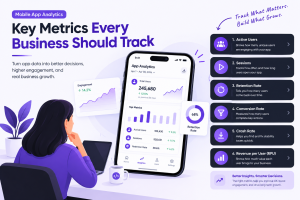
You need to become obsessed with what the data is telling you. Start by tracking a few key metrics that reveal the true health of your app:
- User Retention: This is the big one. What percentage of people come back a day, a week, or a month after downloading? Low retention is a sign of a leaky bucket.
- Session Length: Are users spending seconds or minutes in your app? This is a clear indicator of engagement.
- Active Users (DAU/MAU): Your Daily and Monthly Active Users tell you how large and sticky your audience is. Is it growing?
- Conversion Rates: If you have a freemium or subscription model, what percentage of your free users are becoming paying customers?
Combine this quantitative data with the qualitative feedback you get from app store reviews and support tickets. This combination of "what" people are doing and "why" they're doing it is your roadmap for the future. It will tell you which bugs to squash first, which features to refine, and what to build next. A great app is never finished; it’s a living product that grows and evolves with its community.
Your Top Questions About Building an App

Turning a great idea into a real app brings up a lot of practical questions. Founders always want to know about the budget, timelines, and team-building realities. Here are the straightforward answers I give based on years of launching apps in the U.S. market.
How Much Does It Realistically Cost to Create an App in the U.S.?
The price tag for an app can swing wildly depending on what you’re trying to build. In the U.S., a straightforward Minimum Viable Product (MVP) with just the essential features typically falls between $40,000 and $90,000.
If you're looking at a medium-complexity app with things like third-party API integrations or more advanced user profiles, you should budget somewhere in the $90,000 to $200,000 range. For a truly complex application—think custom AI algorithms, heavy backend infrastructure, or enterprise-level security—the cost can easily climb past $200,000.
Keep in mind that who you hire has a huge impact on these numbers. A well-known agency in a major city like New York or San Francisco will command the highest rates. Also, don't forget to set aside an extra 15-20% of your initial development cost for annual maintenance. An app is a living product that needs ongoing server support and updates, not a one-and-done expense.
What Is the Average Timeline for App Development?
Just like the cost, your timeline is tied directly to the app's complexity. A simple MVP with a tightly focused feature set can often go from design to launch in about 4 to 6 months.
For a more robust app with a richer feature list, you're more likely looking at a 6 to 9 month project. If your vision involves a massive, intricate platform with complex logic and a significant backend, it's wise to plan for a development cycle of a year or even longer.
It's crucial to understand that these timelines assume an efficient, agile process with clear communication and decisive feedback. Scope creep—the relentless addition of "just one more feature"—is the number one cause of delays. Building a buffer into your timeline is always a wise strategy.
Should I Hire a Freelancer, an Agency, or an In-House Team?
This is a huge decision that really comes down to your budget, how much time you can spend managing, and your long-term goals. Each path has its own clear pros and cons.
Freelancers: This is the most budget-friendly route for smaller, well-defined tasks. Need one specific feature built or have a tiny project with a crystal-clear scope? A freelancer is perfect. The challenge, however, is the management headache of coordinating their work, especially if you need several.
Development Agency: This is the sweet spot for most startups. A good agency gives you a pre-built, managed team: project manager, designers, developers, and QA testers. It’s way faster than building your own team and takes a massive management load off your shoulders.
In-House Team: This is the most expensive option, but it gives you maximum control and deep integration with your business. It makes the most sense for well-funded companies where the app is the entire business and needs constant, rapid development cycles.
What Are the Biggest Mistakes to Avoid When Creating an App?
Over the years, I've seen the same few mistakes kill otherwise promising app ideas. If you can steer clear of these common traps, you’ll dramatically boost your odds of success.
The three most common ones I see are:
Skipping Market Validation: This is the single biggest reason apps fail. So many founders fall in love with an idea and build what they assume people want, without ever actually asking them. You have to validate your concept with real users before you spend a dime on code.
Building Too Much at Once: An MVP bloated with features is a recipe for failure. It drives up costs, delays your launch, and ends up confusing your first users. The real goal is to solve one core problem incredibly well, not ten problems poorly.
Ignoring Marketing and Launch: I've seen founders burn their entire budget on development and have nothing left for the launch. A brilliant app with zero users is a complete failure. Your user acquisition strategy needs to be part of the plan from day one, not a panicked afterthought.
At Mobile App Development, we offer the expert insights and strategic roadmap you need to navigate the complexities of the U.S. app market. Whether you're a founder with a fresh idea or a product leader refining your strategy, our resources are designed to help you build, launch, and grow a successful app. Explore our guides and get in touch to discuss your project.



Add Comment