


Before you spend a single dollar on development, let's talk about the most common—and costly—mistake I see founders make: falling in love with an idea before proving anyone actually wants it. A slick app is worthless if it doesn't solve a real problem for a real audience.
This first phase isn't about code or design; it's about disciplined investigation to confirm your idea has legs. You're looking for proof that a problem exists, that people are actively seeking a solution, and that your app can be that solution.
Validating Your App Idea Before You Build Anything

Skipping this validation step feels like you're moving faster, but you're really just sprinting toward a potential dead end. The goal here is to gather hard evidence and de-risk your entire project. Think of it as building a business case, not just an app.
And the business case is compelling. The global mobile app market was valued at USD 252.89 billion in 2023 and is on a rocket ship trajectory toward USD 626.39 billion by 2030. With North America holding roughly 30% of the global app revenue share, the U.S. market is right where you want to be.
Pinpoint a Real, Tangible Problem
The best apps don't start with a flash of genius about a feature; they start with a nagging frustration. Instead of asking "What's a cool app I could build?" shift your focus to "What's a problem that desperately needs a better solution?"
Look at your own life or the world of a specific community you know well. For instance, maybe you have a friend who’s a freelance graphic designer. You watch them struggle to juggle time tracking for five different clients, then waste a whole afternoon manually creating invoices. That's not a vague "productivity" issue—that's a specific, painful problem. An app that automates that exact workflow is infinitely more powerful than a generic to-do list.
Dig In with Targeted Market Research
Once you've zeroed in on a problem, you need to find out if it's a niche-of-one or a widespread headache. This is where you put on your detective hat.
Talk to Actual Humans: Don't just guess. Create quick surveys with Google Forms or SurveyMonkey and share them where your target users hang out. Think niche subreddits, LinkedIn groups, or Facebook communities. Ask about their frustrations, what they've tried, and what they'd pay for a fix.
Follow the Digital Breadcrumbs: Use keyword research tools to see what people are searching for. A high search volume for phrases like "simple invoice app for freelancers" is a massive green flag. It's direct evidence that people are already looking for your solution.
Become a Competitor Archaeologist: Find the existing apps in your space and tear them down. Look at their features, pricing, and—most importantly—their user reviews. The one-star reviews are pure gold. They are a roadmap of user pain points and missing features.
I can't stress this enough: your biggest opportunity often lies in what your competitors aren't doing well. If users repeatedly complain that the leading app is buggy, complicated, or missing a key function, that's your entry point.
To help you stay on track, here's a quick checklist for validating your app idea specifically for the U.S. market.
Idea Validation Checklist for the U.S. Market
| Validation Step | Key Action | Why It Matters |
|---|---|---|
| Problem Definition | Articulate the specific pain point your app solves in one sentence. | A clear problem leads to a clear solution. If you can't state it simply, your idea is too vague. |
| Audience Identification | Define your ideal user. Who are they? Where do they live (U.S. focus)? What are their habits? | You can't build for "everyone." A specific audience makes marketing, design, and feature decisions easier. |
| Market Research | Conduct surveys, interviews, and keyword research to confirm the problem is widespread. | This provides data-driven evidence that a market for your app actually exists, reducing your risk. |
| Competitor Analysis | Identify 3-5 direct and indirect competitors. Analyze their reviews, features, and pricing. | Understanding the existing landscape helps you find your unique angle and avoid their mistakes. |
| UVP Creation | Draft a Unique Value Proposition (UVP) that clearly states why your app is the best choice. | Your UVP is the core of your brand. It tells users why they should choose you over anyone else. |
Following this checklist ensures you’re building on a solid foundation of evidence, not just enthusiasm.
Nail Your Unique Value Proposition
Your Unique Value Proposition (UVP) is your elevator pitch on steroids. It's a short, powerful statement that tells potential users exactly what you do, who you do it for, and why you're better than the alternatives.
A great UVP must answer three questions instantly:
- What is it?
- Who is it for?
- What's the unique benefit?
Let's go back to our freelance designer app. A weak UVP would be: "A productivity app for creatives." It's generic and uninspiring.
A strong UVP would be: "TimeHero is the time-tracking and invoicing app built for U.S. freelancers. Create and send professional invoices in under 60 seconds, so you can get paid faster and get back to designing." See the difference? It's specific, benefit-driven, and hits a clear pain point for a defined audience.
Getting this groundwork right is non-negotiable. For a deeper dive, our guide on how to create an app expands on these initial steps. Only after this validation should you start thinking about the more technical aspects of building your mobile app.
Crafting an App People Actually Want to Use
You’ve validated your idea, and that’s a huge win. But even the most brilliant concept will fail if the app itself is a confusing, frustrating mess. This is where you shift from "what the app does" to "how it feels to use it"—and that's all about user experience (UX) and user interface (UI) design.
Think of it this way: UX is the intuitive path you create for your users, and UI is the visual language—the buttons, colors, and fonts—that guides them along that path. Get this wrong, and users will simply delete your app and never look back. Good design isn't just about making things pretty; it's about making them work for real people.
From Napkin Sketch to Interactive Mockup
Before anyone writes a single line of code, you need a solid blueprint. This process always starts with low-fidelity wireframes. These are just simple, black-and-white sketches that outline your app's structure and flow. Don't worry about colors or fancy fonts yet—the entire point is to focus on pure function.
- What are the essential screens? (e.g., Sign Up, Home, Profile, Settings)
- What goes on each screen? (e.g., buttons, input fields, images)
- How does a user get from one screen to the next?
This is the cheapest and fastest way to get the core logic down. I’ve seen wireframes reveal that a key feature was buried five taps deep, forcing a complete rethink that saved a ton of development time down the road. It’s all about finding those major roadblocks before they become expensive problems.
Once you’re happy with the wireframes, it's time to build a prototype. Using tools like Figma or Adobe XD, you’ll create a high-fidelity, interactive mockup that looks and feels almost like the finished product. This lets you and your test users tap through the app, click on buttons, and truly experience the flow.
I’ve personally watched teams save tens of thousands of dollars by catching a fundamental design flaw during the prototyping phase. A change in Figma is a few minutes of work. That same change after the feature has been coded can be a budget-breaking disaster.
Accessibility Isn’t an Optional Feature
In the U.S. market, building an accessible app is simply not up for debate. It's a legal requirement and a commercial necessity. A huge portion of the population lives with some form of disability, and if your app isn't usable for them, you're willingly ignoring a massive user base while opening yourself up to lawsuits.
The Web Content Accessibility Guidelines (WCAG) are the industry standard you need to follow. This isn't as daunting as it sounds and often boils down to a few key practices:
- Sufficient Color Contrast: Text must be readable against its background. Aim for a contrast ratio of at least 4.5:1 for normal text to accommodate users with low vision.
- Screen Reader Support: Ensure your app is built so users who are blind can navigate it with software like VoiceOver (iOS) or TalkBack (Android). This means every button and image needs a descriptive label.
- Large, Tappable Targets: Buttons and other interactive elements need to be big enough for someone with a motor impairment to tap them without frustration.
- Clear and Simple Language: Avoid jargon. Write clearly and concisely. This helps everyone, not just users with cognitive disabilities.
Failing to meet these standards can lead to serious legal consequences under the Americans with Disabilities Act (ADA). It's far, far easier to build accessibility in from the start than to try and shoehorn it in later.
If you’re ready to really dig into what makes an app intuitive and beautiful, our detailed guide on the fundamentals of mobile app design is the perfect place to go next. It covers everything you need to know to translate your blueprint into a design that truly connects with users.
Choosing Your Tech Stack and Building a Scalable Architecture
You’ve got a solid design, and now it’s time to talk about what goes on under the hood. The technology you pick—your tech stack—is far more than just a list of tools for your engineers. It’s a core business decision that dictates your app's performance, how quickly you can build it, and how much it will cost you down the road.
Getting this right from the start helps you avoid the dreaded technical debt. That’s the real-world cost of choosing an easy, short-term fix today that will inevitably require expensive rework later. Let’s walk through the big decisions you need to make to ensure your app is built on a solid foundation.
Native, Cross-Platform, or Web App
The very first fork in the road is deciding on your development approach. There's no one-size-fits-all answer here; the best path depends entirely on your budget, timeline, and what you need your app to do.
Native Development (Swift for iOS, Kotlin for Android): This is the premium option. You’re building two entirely separate apps, one for each platform, using their official programming languages. The upside? Unbeatable performance, rock-solid reliability, and perfect integration with device hardware like the camera, GPS, and biometric sensors. The downside is that it’s the most expensive and time-consuming route, requiring two codebases and often, two distinct engineering teams.
Cross-Platform Development (React Native, Flutter): This is the sweet spot for many startups and even established companies. You write the code once, and it runs on both iOS and Android. Modern frameworks have gotten so good that the user experience is often indistinguishable from a native app. This path dramatically cuts down on development time and cost.
Progressive Web App (PWA): Think of a PWA as a supercharged website that can be "installed" on a user's home screen, send push notifications, and even function offline. It’s the fastest and cheapest option, but it comes with significant limitations. PWAs have restricted access to device hardware and, most importantly, can't be listed on the major app stores, which is a huge blow to discoverability.
For many businesses targeting the U.S. market, the math is compelling. Shifting from a native-only strategy to cross-platform can slash development costs by 30-40%. This smart move allows you to reach both the 72.55% Android and 27.04% iOS market shares with a single, efficient effort. With the cross-platform market projected to hit $47.61 billion by 2035, it’s a financially sound and powerful strategy.
Your development choice is a trade-off. An intense, graphics-heavy game will likely demand a native build. But for a content-driven app or an e-commerce platform, a cross-platform solution often delivers the best balance of performance and budget.
To help clarify this decision, here’s a breakdown of how the two most popular approaches stack up.
Development Approach Comparison: Native vs. Cross-Platform
| Factor | Native (iOS/Android) | Cross-Platform (React Native/Flutter) |
|---|---|---|
| Performance | Highest possible; direct access to native APIs and hardware. | Very high, but a slight overhead exists. Near-native for most use cases. |
| Cost | High. Requires two separate codebases and often larger teams. | Lower. Single codebase reduces development and maintenance effort. |
| Time to Market | Slower. Building and testing two apps takes longer. | Faster. "Write once, run anywhere" significantly speeds up the process. |
| UI/UX | Flawless. Perfectly matches the platform's design guidelines. | Excellent. Can mimic native components very closely. |
| Hardware Access | Complete and direct access to all device features. | Generally good, but may require custom modules for newer or niche features. |
| Maintenance | Complex. Updates must be managed across two separate codebases. | Simpler. A single codebase is easier to update and debug. |
Ultimately, a cross-platform approach offers a pragmatic and efficient path for most apps, striking an ideal balance between cost, speed, and a high-quality user experience.
Architecting for Future Growth
Once you’ve picked your front-end approach, you need to think about the engine that will power it all: your backend architecture. A well-planned architecture is what enables an app to grow from 100 users to 1,000,000 without breaking a sweat. You have to plan for scale from day one.
The key here is building a modular architecture. Instead of creating a single, massive block of code (a monolith), you break your app into smaller, independent services. For instance, user authentication is one module, the payment system is another, and your product search is a third. This separation makes your entire system easier to maintain, test, and update. If user sign-ups suddenly surge, you can scale just that one module without touching the rest of the app.
Thinking ahead on your architecture also means deciding on:
- Your Backend: This is the server-side brain of your operation. You can build a custom backend with languages like Node.js or Python, or use a Backend-as-a-Service (BaaS) like Firebase, which provides pre-built infrastructure for things like databases, authentication, and hosting.
- Your Database: This is where all your app's data lives. SQL databases like PostgreSQL are fantastic for structured, relational data (think user profiles and order histories). NoSQL databases like MongoDB offer more flexibility, which is great for apps with evolving data needs.
- API Integrations: Your app won’t exist in a vacuum. It will need to communicate with third-party services via APIs for things like processing payments (Stripe), displaying maps (Google Maps Platform), or enabling social logins. Map these out early. Our guide to the best mobile app development tools can help you explore options that fit your architecture.
This flowchart perfectly illustrates how a brilliant idea can either flourish or wither based on the quality of its design and the strength of its technical foundation.

A solid architecture isn’t an afterthought—it’s the blueprint for a product that can stand the test of time. By making smart choices now, you're not just building an app for today; you're creating a scalable platform ready for future growth.
From Blueprint to Building: Development, Testing, and Your MVP

With your architecture and tech stack decided, it’s time to start building. But you don’t build the entire app at once. The smartest move you can make is to focus on a Minimum Viable Product (MVP).
An MVP isn't a buggy or incomplete app. It's the most stripped-down, essential version of your product that solves one core problem for your target user, and does it well. For a ride-sharing app, this means nailing the process of booking a ride from point A to point B. Forget split fares, loyalty points, or scheduling rides in advance—that all comes later.
The goal here is twofold: get to market quickly and start learning from real users immediately. Launching a focused MVP prevents you from sinking your budget into features that, it turns out, nobody actually wanted. The feedback you get from those first users is the most valuable currency you have.
Build the Core, Not the Castle
Defining your MVP is an exercise in ruthless prioritization. You need to map out every feature you can dream of and then get tough, sorting them into clear categories:
- Must-Haves: The absolute bare minimum for the app to function and deliver on its core promise. This is your MVP.
- Should-Haves: Important features that add real value but can wait until the next version.
- Nice-to-Haves: The bells and whistles. Cool ideas for the future, but completely non-essential for launch.
For your first build, you focus only on the "Must-Haves." If you're building an app for freelance designers to track time and send invoices, the MVP is just that: log hours and generate a basic invoice. Things like integrating with QuickBooks or calculating estimated taxes are classic "Should-Haves" for a future update.
An MVP is about learning, not just launching. It's an experiment designed to test your most critical assumption: "Will people actually use this to solve their problem?" The answer to that question dictates everything that comes next.
As your developers start coding these core features, your quality assurance (QA) team should be working right alongside them. Testing isn't something you tack on at the end; it's a continuous process that protects your app's integrity from the very first line of code.
You Can't Afford to Skip Rigorous Testing
Quality assurance is your defense against a disastrous launch. It's not just about finding bugs; it's about making sure your app is fast, secure, and intuitive on the countless devices your users will have. A single crash on launch day can lead to a flood of one-star reviews and kill your momentum before it even starts.
A good QA plan has several layers, each designed to vet a different aspect of your app.
Functional Testing
This is the most basic check: does it work? When a user taps a button, does the intended action happen? Functional testing is the painstaking process of verifying that every single feature, link, and form behaves exactly as designed. No surprises.
Performance Testing
How does the app hold up under pressure? Performance testers are looking at key metrics like app load time, responsiveness, and memory usage. Most importantly, they're measuring battery drain. An app that hogs resources and kills a user's battery will get deleted in a heartbeat, no matter how useful it is.
Security Testing
Here's where you actively try to hack your own app. Testers probe for vulnerabilities, looking for things like insecure data storage on the device or unencrypted communication with your server. In an age where data breaches are front-page news, skipping this step is a massive liability.
User Acceptance Testing (UAT)
Finally, you put the app in the hands of real, live users from your target audience. UAT isn't about finding bugs—it's about confirming you built the right product. Is it intuitive? Does it solve their problem effectively? This is your final gut-check before going live.
By embedding these testing cycles directly into your development sprints, you create a powerful rhythm of building, validating, and refining. This approach catches costly issues early and ensures the app you release is polished, stable, and ready to make a killer first impression.
Getting Your App Live and Growing It for the Long Haul
You’ve compiled the code, smashed the last bug, and your app is finally done. It’s a huge milestone, but getting the app built is really just the price of entry. The real work starts now. This is the moment you switch gears from being a developer to being a marketer, a business owner, and a strategist.
Your first hurdle? Getting past the gatekeepers at the Apple App Store and Google Play Store. This isn't a simple file upload. It’s a delicate process of convincing both the store reviewers and your future customers that your app is worth their time and attention.
Nailing Your First Impression on the App Stores
Think of your app store listing as your digital storefront. A sloppy, uninspired page is the equivalent of a fantastic product buried in the back of a cluttered, dusty shop. To get noticed, you have to get good at App Store Optimization (ASO), which is basically SEO but for mobile apps.
It all starts with your app’s name and subtitle. They need to do double duty: describe what your app does and hit the keywords people are actually searching for. So, instead of a generic name like "Mindful," try something more descriptive like "Mindful: Guided Meditation & Sleep." It immediately tells people the app's purpose while catching crucial search terms.
Your app description is your sales pitch.
- Hook them fast. The first few lines are all most people will see without tapping "more." Start with your single most compelling benefit.
- Sell the outcome, not the tools. Don't just list features. Explain how your app makes someone's life easier, better, or more fun.
- Make it scannable. Use bullet points to break up big blocks of text. People browse app stores quickly, so make your key points easy to absorb.
Your screenshots and app preview video are, frankly, even more important than the text. We're visual creatures. Show, don't just tell. Use clean text overlays on your screenshots to call out key functions or benefits. A sharp, well-edited preview video can boost your install rate by over 23% because it lets people see the app in action.
I’ve seen countless apps get tripped up during Apple's review process. A common reason for rejection is a mismatch between the app's description and its actual functionality. Be brutally honest about what your app can and can't do, and make sure every feature you mention is fully operational.
How You'll Actually Make Money
Getting the download is one thing; building a business is another. You need a solid plan for generating revenue and, just as importantly, giving users a reason to stick around. In the U.S. market, a few core monetization models have proven themselves time and again.
| Monetization Model | Works Best For… | A Great U.S. Example |
|---|---|---|
| Freemium | Apps with a great free experience and compelling paid upgrades. | Evernote gives you powerful note-taking for free, but tempts power users with a subscription for offline access and more storage. |
| Subscription | Content-driven apps or ongoing services that are updated regularly. | Calm offers a constantly growing library of meditations and sleep stories, making the recurring fee feel worthwhile. |
| In-App Purchases (IAP) | Games and apps where users can buy digital goods or consumables. | Pokémon GO lets players buy PokéCoins to get items that speed up their progress or enhance gameplay. |
| One-Time Purchase | Niche utility apps that solve one specific problem really well. | Procreate is a professional-level digital art app. You buy it once and own it forever. |
The right model for you boils down to the kind of value your app delivers. Subscriptions are all the rage because they provide predictable revenue, but the trade-off is immense pressure to constantly add new content or features to keep people from canceling.
The Never-Ending Cycle of Growth
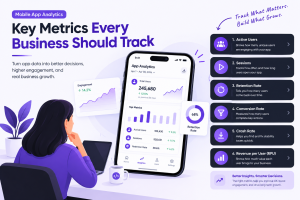
Here’s the truth: your work on the app is never really finished. Lasting success comes from a continuous loop of measuring user behavior, learning from it, and making your app better. You absolutely must have analytics set up from day one with a tool like Google Analytics for Firebase or Mixpanel.
Ignore the vanity metrics and focus on the Key Performance Indicators (KPIs) that tell you the real story:
- Daily & Monthly Active Users (DAU/MAU): How "sticky" is your app? Are people making it a habit?
- User Retention Rate: What percentage of people are still using your app after 1 day, 7 days, and 30 days? This is a huge indicator of long-term health.
- Session Length: When people do open your app, how long are they sticking around?
- Churn Rate: What percentage of your users are you losing each month?
- Customer Lifetime Value (CLV): On average, how much money will a single user generate for you over their entire time with your app?
This data, paired with real feedback from app store reviews, emails, and surveys, is the fuel for your product roadmap. A recurring bug report prompts an urgent fix. A feature request that keeps popping up becomes the centerpiece of your next big update. This is how you build an app that doesn’t just launch with a splash but grows into a sustainable business.
Answering Your Big App-Building Questions
Even with the best playbook, a few big questions always come up when you're getting ready to build an app. I’ve heard these from countless founders, so let's tackle them head-on with some straight-to-the-point answers.
How Much Does It Really Cost to Build an App?
This is always the first question, and the honest answer is: it depends. It's not a cop-out, it's just the reality. Asking the cost of an app is like asking the cost of a car—are we talking about a reliable sedan or a custom-built supercar?
A simple app with a few core features, maybe for internal business use, could land in the $30,000 to $70,000 range. But if you’re dreaming bigger, think about apps like Instagram or Uber. A more complex build with a custom UI, server-side logic, and multiple third-party integrations will quickly push you into the $150,000 to $300,000 territory, and that's just for version one.
The price tag is really driven by three things:
- Feature Complexity: Every screen, button, and user interaction adds time and cost. A real-time chat feature is worlds more complex than a static "About Us" page.
- Platform Choice: Building two separate, native apps for iOS and Android will always cost more than a single app built with a cross-platform framework.
- Design & Polish: A slick, custom-animated interface requires significantly more design and development effort than using the standard, out-of-the-box components provided by Apple and Google.
My best advice for managing costs? Launch with a razor-sharp Minimum Viable Product (MVP). Solve one problem for one user group, and do it exceptionally well. This gets you to market, starts the feedback loop, and validates your idea without you having to bet the farm on a massive initial investment.
How Long Will the Development Process Take?
Just like cost, the timeline is tied directly to complexity. I’ve seen straightforward MVPs go from concept to launch in 3 to 5 months. On the flip side, a sophisticated, feature-rich application can easily take 6 to 12 months or more to get right.
And remember, "development" isn't just about writing code. A huge chunk of the timeline is spent on critical work before and after the code is written.
Here's a realistic look at how the time breaks down:
- Discovery & Design (1-2 months): This is where we nail down the strategy. It involves everything from user research and wireframing to creating the final UI and interactive prototypes. Don't rush this.
- Development (2-6+ months): The main event. This is where engineers build the front-end your users see and the back-end that makes it all work. It's almost always the longest phase.
- Testing & QA (1 month): You can't skip this. We're talking about dedicated time for hunting down bugs, checking performance, and making sure the app is secure.
- Deployment (1-2 weeks): This involves preparing all the marketing materials for the app stores and navigating Apple and Google's unique review processes.
Things can and do get delayed, usually when the project scope changes halfway through. Sticking to your MVP plan is the single best way to keep your project on schedule.
Can I Build an App with No Coding Experience?
Yes, absolutely. You don't need to be a developer to be a successful app founder. Your job is to be the expert on the vision, the customer, and the business model. For the technical side, you have two great paths.
No-Code/Low-Code Platforms: Tools like Bubble or Adalo are fantastic for non-technical founders. They use visual, drag-and-drop editors to help you build a functional app. They’re perfect for creating a simple MVP to test an idea quickly and affordably, but be aware of their limitations in performance and customizability as you scale.
Hire a Freelancer or an Agency: This is the most common route for building a serious, scalable product. You provide the domain expertise and the vision, while they handle the technical execution. This path lets you build a completely custom app without writing a line of code yourself.
Should I Choose iOS or Android First?
If your budget forces you to pick one platform to start, your decision should be all about your target user.
Go with iOS-First: This is a very common strategy, especially in the U.S. market. Historically, iPhone users have shown a greater willingness to spend money on apps and in-app purchases. If your revenue model is built on direct user payments, starting with iOS is often a smart financial bet.
Go with Android-First: Globally, Android dominates market share. If your goal is maximum user reach, particularly in markets across Europe, Asia, or South America, starting with Android gives you access to a much larger potential audience.
That said, modern cross-platform tools like React Native and Flutter have changed the game. They often represent the most efficient path, allowing you to develop for both iOS and Android from a single codebase. You get access to both markets without doubling your initial cost.
Ready to turn your app idea into a reality for the U.S. market? At Mobile App Development, we translate complex technical challenges into actionable business strategies. Let's build your digital success together.



Add Comment