

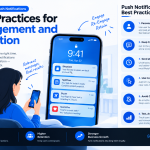
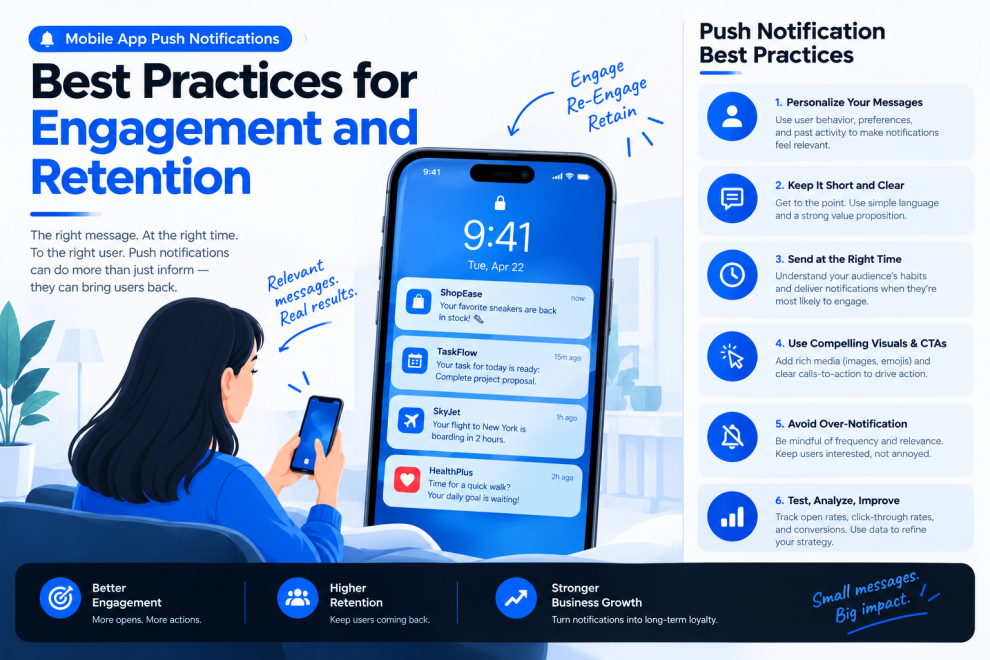

Push notifications allow mobile applications to communicate with users even when the app is not actively open. They can remind customers about appointments, provide delivery updates, communicate important account activity, and help users return to unfinished tasks.
However, notifications can also become a source of frustration when they arrive too frequently, contain irrelevant messages, or interrupt users at the wrong moment.
Mobile app push notification strategy is about delivering useful information at the right time while respecting user preferences and attention.
For businesses, a thoughtful notification experience can support engagement and retention without turning the app into a constant source of interruption.
What Are Mobile App Push Notifications?
Push notifications are messages delivered to a device through the relevant platform’s notification infrastructure.
Depending on the application and operating system, they may appear on the lock screen, in the notification center, or as banners.
Common use cases include:
- Delivery and order status updates
- Appointment reminders
- Account security alerts
- Messages and collaboration activity
- Payment confirmations
- Relevant product announcements
- Reminders for user-created tasks
- Time-sensitive service updates
Notifications are not appropriate for every interaction. Some information is better presented inside the application when the user next opens it.
The decision should depend on urgency, relevance, user expectations, and the consequences of missing the information.
Why Push Notification Strategy Matters
A notification creates a direct interruption in a user’s day. That interruption should provide enough value to justify the attention it demands.
Irrelevant notifications can lead users to mute an app, disable notification permissions, or uninstall the product.
A well-designed strategy focuses on the quality of communication rather than the number of messages sent.
Businesses should consider whether each notification helps users complete a task, stay informed, or receive information they have chosen to follow.
1. Define a Clear Purpose for Every Notification
Before implementing a notification, establish why it is needed.
A payment confirmation provides information about a completed transaction. A delivery update helps a customer understand when an order may arrive. A reminder can help someone return to a task they intentionally scheduled.
These notifications have clear purposes.
Promotional messages require more care because their value depends on the user’s interests, preferences, and expectations.
For every notification type, define:
- The event that triggers it
- The intended recipient
- The information it communicates
- Whether it requires immediate delivery
- The action the user can take
- The conditions under which it should not be sent
A documented notification plan helps product, engineering, and marketing teams avoid duplicate or conflicting messages.
2. Ask for Permission at the Right Moment
Requesting notification permission immediately after an app launches may not give users enough context to make an informed decision.
Where platform rules permit, explain the benefit before presenting the operating system’s permission prompt.
For example, a travel app might explain that notifications can provide flight status updates and gate changes.
The explanation should be relevant to the feature the user is trying to use. Avoid implying that notifications are essential when the app can still perform its core functions without them.
Respect the user’s choice if permission is declined. Provide appropriate settings or in-app alternatives where possible, rather than repeatedly pressuring users to enable notifications.
Permission requirements and available prompting patterns differ across operating systems and versions, so implementation should follow current platform guidance.
3. Personalize Messages Based on Meaningful Context
Personalization can make notifications more useful, but it should be based on information that genuinely improves relevance.
For example, a shopping app can notify a user about an order they placed. A task management app can alert someone about a task assigned to them.
Relevant personalization may use a user’s selected preferences, active tasks, or explicit subscriptions.
Avoid collecting unnecessary information or making sensitive assumptions to personalize messages.
A notification should never reveal private details on a lock screen without considering the user’s privacy expectations. For sensitive content, a neutral message that directs the user to authenticate within the app may be more appropriate.
Personalization should increase usefulness, not create a sense of surveillance.
4. Choose Timing Carefully
A relevant message can still be disruptive if it arrives at the wrong time.
Timing should reflect the urgency of the event and the user’s likely expectations.
A security alert may need to arrive immediately. A non-urgent product recommendation may be better delivered at a less disruptive time or omitted altogether.
Useful considerations include:
- The urgency of the information
- The user’s local time
- The type of notification
- The user’s selected schedule
- Whether a similar message was sent recently
- Whether the underlying task is still relevant
Do not delay genuinely urgent messages merely to fit a general engagement schedule.
For non-urgent communication, batching or quiet-hour preferences can reduce interruptions.
5. Control Notification Frequency
Frequent messages can overwhelm users even when each message is individually relevant.
Create frequency rules that account for notification type, recent activity, and user preferences.
For example, an application may combine several low-priority updates into one summary rather than sending separate alerts for every event.
A notification frequency cap can help prevent promotional campaigns from dominating the user’s attention.
However, different categories may need different treatment. Combining a security alert with routine marketing messages would be inappropriate.
Review the complete notification experience across the product, including messages sent by separate teams or backend services.
6. Write Clear, Concise Notification Copy
Notifications often have limited space, particularly on smaller screens.
The message should communicate the most important information immediately.
Prefer specific wording over vague announcements.
For example:
Less useful: “Something important has changed!”
More useful: “Your delivery is arriving today.”
The second message provides a clear reason to pay attention.
Notification copy should accurately describe what happened and avoid exaggerated urgency.
If a message includes a call to action, make sure the destination matches the promise made in the notification.
A notification should remain understandable without requiring users to open the app simply to discover why it was sent.
7. Deep-Link Users to the Relevant Screen
When users tap a notification, they should arrive at the screen that helps them continue the relevant task.
A delivery update might open the corresponding order. A collaboration alert could lead to the relevant conversation or project item.
Sending every notification to the app’s home screen adds unnecessary navigation and can make the message feel less useful.
Deep linking requires careful handling.
The app should account for situations in which a user is signed out, the target content has been removed, permissions have changed, or the application must perform additional initialization.
For sensitive actions, the destination should enforce normal authentication and authorization controls. A notification tap must never be treated as proof that the user has permission to access protected information.
8. Handle Notification States and Failures
Notification systems depend on several components, including application code, backend services, device settings, and platform delivery infrastructure.
Messages may be delayed, duplicated, or unavailable under certain conditions.
Applications should be designed to handle these situations appropriately.
For example, an order status displayed inside the app should come from a reliable source of current order information rather than assuming that the last notification represents the latest state.
Use stable event identifiers and suitable deduplication strategies where needed.
If the app cannot navigate to the original content, provide a sensible fallback screen rather than showing an error or leaving users on a blank page.
9. Respect Privacy and Notification Preferences
Users should have reasonable control over the types of messages they receive.
Where appropriate, provide settings for categories such as account activity, reminders, order updates, and promotions.
Not every category should be treated identically. Users may want essential service updates while opting out of marketing notifications.
Notification content should avoid exposing unnecessary personal or confidential information.
Businesses should also consider applicable consent requirements, platform policies, data-protection obligations, and the privacy practices of third-party messaging services.
Make preferences understandable and ensure that changes are applied consistently across the relevant systems.
10. Measure Meaningful Notification Performance
Notification analytics can help teams understand whether their messaging strategy is useful.
Common measurements include:
- Permission opt-in rate
- Delivery and open rates, where measurable
- Click-through rate
- Completion of the intended action
- Conversion following a message
- Opt-out rate
- App retention
- Uninstall trends
No single metric tells the whole story.
A high click-through rate may not indicate success if users quickly abandon the destination screen. Similarly, a notification that prevents an account security problem may be valuable even if it receives few clicks.
Define success based on the notification’s purpose.
Use appropriate attribution and experimentation methods, and account for platform privacy restrictions that can limit measurement.
11. Test Notifications Before Launch
Notification testing should cover more than whether a message appears on a device.
Test scenarios such as:
- Notifications when the app is open or closed
- Permission denied or later revoked
- A user signed out of the app
- Tapping a notification with expired content
- Multiple messages arriving close together
- Network interruptions
- Different screen sizes and operating system versions
- Time-zone and scheduling behavior
- Duplicate or delayed events
Also test notification copy, deep-link destinations, and privacy behavior on the lock screen.
A controlled rollout can help identify problems before the notification strategy reaches the entire user base.
12. Build an Ethical Notification Strategy
Notifications should help users achieve their goals rather than manipulate their behavior.
Avoid false urgency, misleading badges, repeated prompts designed to pressure users, or messages that imply consequences that do not exist.
A notification should be sent because it is useful, expected, or genuinely important.
Review messages that generate complaints, high opt-out rates, or little meaningful engagement. These may indicate that the timing, audience, frequency, or purpose needs to change.
Long-term trust is more valuable than a temporary increase in app opens.
A Practical Push Notification Workflow
A structured implementation process helps teams manage notifications effectively.
Step 1 — Identify use cases: Determine which events genuinely benefit from an external notification.
Step 2 — Define audiences and rules: Establish eligibility, preferences, frequency limits, and suppression conditions.
Step 3 — Design the message: Write concise copy and determine the correct destination.
Step 4 — Implement securely: Integrate platform services, backend event handling, and appropriate access controls.
Step 5 — Test scenarios: Validate delivery behavior, deep links, permissions, failures, and privacy.
Step 6 — Measure outcomes: Evaluate whether users complete the intended task and whether the message creates unwanted interruptions.
Step 7 — Improve continuously: Use user feedback and performance data to refine the strategy.
Companies such as GeekyAnts work across mobile app development and digital product engineering, where notification systems need to align backend event processing with the user experience and privacy expectations.
Final Thoughts
Push notifications can improve the mobile experience when they deliver relevant information at the right moment.
Clear messaging, thoughtful timing, controlled frequency, useful deep links, privacy-conscious design, and meaningful measurement help applications communicate without overwhelming users.
The objective is not to send more notifications. It is to make every notification worth receiving.
A good push notification helps users do something useful. A great notification does so without making them regret enabling it.



Add Comment