





Many businesses depend on mobile applications that were built years ago. These apps may still support important customer journeys, internal operations, payments, bookings, or employee workflows.
Over time, however, the technology behind them can become harder to maintain. Development slows down, integrations become fragile, performance issues accumulate, and introducing new features becomes increasingly expensive.
Replacing the entire application may seem like the simplest answer, but a complete rebuild can introduce significant cost, operational risk, and migration challenges.
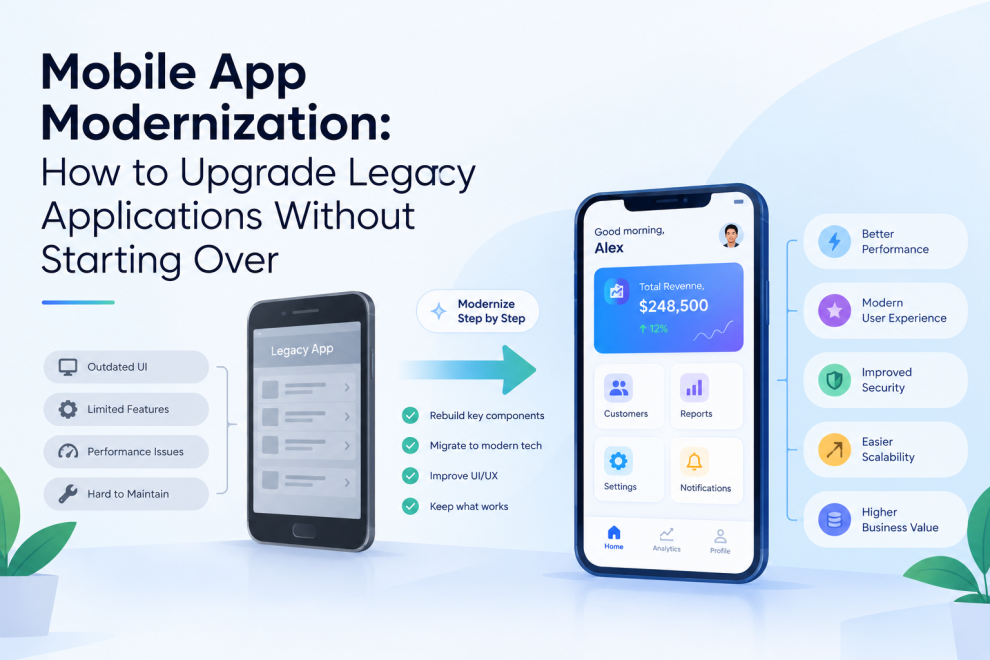
Mobile app modernization offers another path: improving an existing application through targeted architectural, technical, and user experience changes while preserving the business capabilities that continue to work.
The right strategy depends on the application’s current condition, business priorities, technical constraints, and tolerance for disruption.
What Is Mobile App Modernization?
Mobile app modernization is the process of updating an existing mobile application to meet current technical and business requirements.
It can involve changes to the application architecture, programming framework, backend services, user interface, security controls, deployment process, or integration strategy.
Modernization does not necessarily mean rewriting every screen or replacing every system.
A business might update an outdated authentication flow, replace an unsupported library, improve the application’s API layer, or migrate a high-risk module while leaving stable functionality intact.
The objective is to make the application easier to maintain, more reliable, and better suited to future development.
Signs That a Mobile App Needs Modernization
Not every older application requires a major overhaul. Some systems remain reliable because their architecture is appropriate and their maintenance practices are strong.
However, certain warning signs suggest that modernization deserves attention.
1. Feature Development Is Becoming Slower
If every new feature requires changes across unrelated parts of the application, the codebase may have become tightly coupled.
This makes even small updates harder to test and release.
2. Dependencies Are Outdated
Unsupported frameworks, libraries, and SDKs can introduce compatibility problems and security exposure.
Teams may also struggle to adopt current platform capabilities when their dependencies no longer support them.
3. Performance Problems Are Increasing
Slow startup times, excessive battery consumption, memory issues, and unresponsive screens can damage the user experience.
These symptoms may come from inefficient code, network dependencies, poor data handling, or outdated architecture.
4. Integrations Are Difficult to Maintain
Legacy applications may depend on older APIs, custom integrations, or backend systems that are difficult to change.
Adding new payment providers, analytics services, identity systems, or business platforms can become unnecessarily complicated.
5. The App No Longer Meets Business Needs
An application may function correctly while failing to support new customer expectations, operating models, accessibility requirements, or product strategies.
Modernization should address these business limitations as well as technical debt.
Modernization vs. Rebuilding: Which Is Better?
The choice between modernization and a complete rebuild should be based on evidence rather than a preference for newer technology.
Modernize the existing app when:
- Most core functionality remains useful.
- The current codebase can be improved incrementally.
- Business operations cannot tolerate a long replacement project.
- Existing integrations and domain logic are valuable.
- Risks can be reduced through phased changes.
Consider a rebuild when:
- Fundamental architectural limitations prevent necessary changes.
- The application is no longer compatible with essential platforms.
- The codebase is poorly understood and difficult to test.
- Major business requirements cannot be supported through reasonable incremental improvements.
- The cost and risk of retaining the existing system exceed the cost of replacement.
A hybrid approach is also possible. Teams can build a new application shell or replace selected modules while retaining proven business services.
Before making the decision, assess the current system’s quality, operational importance, integration dependencies, and realistic migration costs.
1. Audit the Existing Application
Modernization should begin with an assessment of the current product.
Review the application’s architecture, source code, dependencies, backend services, release process, performance, user experience, and operational history.
The assessment should answer several questions:
- Which features are still actively used?
- Which components create the most maintenance effort?
- What technical risks could affect users?
- Which integrations are essential?
- What prevents the team from delivering new features?
- Which parts of the app should remain unchanged?
Usage analytics and customer feedback help distinguish valuable functionality from legacy features that can be removed.
The result should be a prioritized modernization roadmap rather than a list of technologies to replace.
2. Define a Target Architecture
An application does not become maintainable simply because its framework is updated.
Teams should define how the modernized application will separate responsibilities, manage state, communicate with services, handle errors, and support testing.
Depending on the product, the architecture might include:
- A presentation layer for screens and user interactions
- A domain layer for business rules
- A data layer for repositories and data access
- API clients for backend communication
- Shared components for reusable functionality
- Observability tools for diagnostics and performance monitoring
Not every application needs a complex architecture. The goal is to introduce clear boundaries that match the product’s scale and expected rate of change.
For a small application, a simpler structure may be sufficient. For a large enterprise app with many teams and modules, stronger boundaries can help reduce coordination costs.
3. Choose the Right Modernization Strategy
There are several ways to modernize an existing application.
Refactoring
Refactoring improves internal code structure without intentionally changing the application’s external behavior.
It is useful when the existing framework and architecture remain viable but specific areas have become difficult to maintain.
Framework Migration
Teams may migrate from an outdated framework or development approach to a supported alternative.
This can improve tooling, platform compatibility, developer productivity, and access to modern libraries. However, framework migration should be justified by concrete requirements rather than trends alone.
Incremental Module Replacement
Instead of rewriting the entire application, teams replace individual modules as needed.
For example, a business might modernize authentication and account management first, then update reporting or payments in later phases.
Backend Modernization
Sometimes the mobile interface is not the primary problem. Slow or inflexible backend services may be responsible for poor performance and development delays.
Updating APIs, improving database access, or separating backend responsibilities may deliver greater value than rebuilding the mobile app.
User Interface Refresh
A focused UX and UI update can improve navigation, accessibility, consistency, and task completion without requiring a complete technical rewrite.
The strongest strategy is often a combination of these approaches.
4. Modernize in Small, Testable Phases
Large-scale rewrites can create long periods in which users see little improvement while development risk accumulates.
A phased approach makes progress easier to validate.
A team might begin with a frequently used but relatively independent feature, establish the migration process, and then apply the lessons to more complex areas.
For each phase, define:
- Scope and success criteria
- Dependencies and affected user journeys
- Testing requirements
- Rollback or recovery plans
- Release and monitoring procedures
Incremental modernization also allows business stakeholders to evaluate results before approving the next investment.
However, not every component can be migrated independently. Legacy applications may have shared state, tightly coupled workflows, or backend dependencies that require additional preparation.
5. Preserve Data and Backend Compatibility
One of the most challenging parts of modernization is maintaining compatibility with existing systems.
Users may have saved preferences, cached records, active sessions, or locally stored information that must remain available after an update.
Backend services may also support multiple versions of the app during a gradual rollout.
To reduce disruption, teams should evaluate:
- Data migration and schema compatibility
- API versioning and backward compatibility
- Authentication and session continuity
- Offline data synchronization
- Integration dependencies
- Rollback behavior
When an application supports offline workflows, synchronization and conflict resolution deserve particular attention.
A technically successful release can still fail if users lose data or existing business processes stop working.
6. Improve Performance Alongside Architecture
Modernization provides an opportunity to investigate performance problems using measurements rather than assumptions.
Useful areas to examine include:
- Cold-start and screen-loading times
- Network request frequency
- Image and asset handling
- Memory consumption
- Battery usage
- Database operations
- Main-thread work
- Crash rates and application freezes
Profiling should identify the most significant bottlenecks before optimization begins.
For example, reducing unnecessary API calls may improve performance more than replacing a UI framework. Likewise, better caching may help users in unstable network conditions.
Teams should define performance targets based on actual user journeys and device conditions, then measure whether each modernization phase produces meaningful improvements.
7. Strengthen Security and Privacy
Legacy applications may use outdated authentication flows, insecure storage patterns, unsupported dependencies, or overly broad device permissions.
Modernization is a useful opportunity to reassess these controls.
Depending on the application, improvements may include stronger session management, secure credential storage, modern transport security, better API authorization, dependency updates, and more deliberate data-retention policies.
Security changes need careful testing because they can affect login, account recovery, payment workflows, and existing integrations.
For applications handling financial, health, or other sensitive information, teams should also identify applicable regulatory and contractual requirements before changing data flows.
8. Modernize the User Experience
A legacy app can be technically stable and still frustrate users.
Common problems include inconsistent navigation, outdated interaction patterns, unclear error messages, inaccessible controls, and workflows that require too many steps.
UX modernization should start with user research and task analysis.
Identify where users abandon workflows, repeat actions, make errors, or rely on support teams.
Then prioritize changes based on their impact.
A complete visual redesign is not always necessary. Clearer labels, improved navigation, better form validation, and more useful loading and error states can make a substantial difference.
Preserve familiar workflows where consistency matters, especially for business users who depend on the app daily.
9. Upgrade Testing and Release Practices
A modernization project should improve the team’s ability to release changes safely.
Legacy applications sometimes rely heavily on manual testing or have limited automated coverage. This makes it difficult to determine whether a change has affected unrelated functionality.
A stronger quality strategy can combine:
- Unit tests for business logic
- Integration tests for services and data flows
- UI tests for critical user journeys
- Regression testing for existing behavior
- Performance and stability testing
- Security checks for relevant risks
- Testing across supported devices and operating systems
Automated tests should focus first on high-value workflows, not simply on achieving a particular coverage percentage.
Where feasible, staged rollouts and feature flags can help teams detect problems before exposing every user to a change. Monitoring and rollback procedures should be prepared before deployment.
10. Measure Modernization Results
Modernization should deliver measurable outcomes.
Technical improvements matter, but they should connect to product and business goals.
Possible measures include:
| Area | Example measurement |
|---|---|
| Performance | Startup time, screen response time |
| Reliability | Crash rate, failed requests |
| Development | Time to deliver a feature |
| Maintenance | Time spent resolving defects |
| User experience | Task completion, abandonment |
| Operations | Release frequency, recovery time |
| Security | Vulnerability remediation time |
Establish a baseline before work begins. Without it, teams may complete a migration without knowing whether the application has actually improved.
Choose a manageable set of metrics tied to the problems identified during the initial assessment.
Common Mobile App Modernization Mistakes
Several avoidable mistakes can increase cost and risk.
Replacing technology without a clear business reason. A newer framework does not automatically resolve poor architecture or unclear requirements.
Rebuilding everything at once. Large rewrites can delay value and increase the number of unknowns.
Ignoring existing users. Changes that disrupt familiar workflows can undermine adoption even when the underlying technology improves.
Underestimating integrations. External services, backend dependencies, and legacy data structures can complicate migration.
Treating testing as a final phase. Regression testing and release planning need to be part of the modernization strategy from the beginning.
Failing to measure results. Teams need evidence that the new application is more reliable, maintainable, or useful than the previous version.
A Practical Mobile App Modernization Roadmap
A straightforward roadmap can help teams organize the work.
Phase 1 — Assess: Audit the codebase, architecture, performance, dependencies, and user experience.
Phase 2 — Prioritize: Identify the highest-risk problems and the improvements with the clearest business value.
Phase 3 — Plan: Define the target architecture, migration sequence, compatibility requirements, and success metrics.
Phase 4 — Modernize: Implement changes in manageable, testable increments.
Phase 5 — Validate: Test functionality, performance, security, accessibility, and compatibility.
Phase 6 — Release and learn: Deploy carefully, monitor results, collect feedback, and refine the roadmap.
Companies such as GeekyAnts work across mobile app development and digital product engineering, areas where modernization decisions need to balance technical improvements with user experience and long-term product goals.
Final Thoughts
Mobile app modernization is not simply about making an old application look new. It is about improving the system’s ability to serve users and adapt to changing business needs.
The most effective approach begins with an honest assessment, identifies the problems that matter most, and chooses an appropriate mix of refactoring, migration, backend improvements, and UX changes.
A full rebuild may be necessary in some cases, but it should be a deliberate decision rather than the default response to technical debt.
Modernize with a clear purpose, validate improvements in stages, and preserve the business value that already works.




Add Comment