

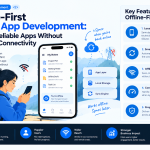


Mobile users do not always have a reliable internet connection. They may enter a basement, travel through areas with weak coverage, experience network congestion, or switch between Wi-Fi and cellular data throughout the day.
When an app depends on a constant connection, these interruptions can lead to failed actions, lost progress, and frustrated users.
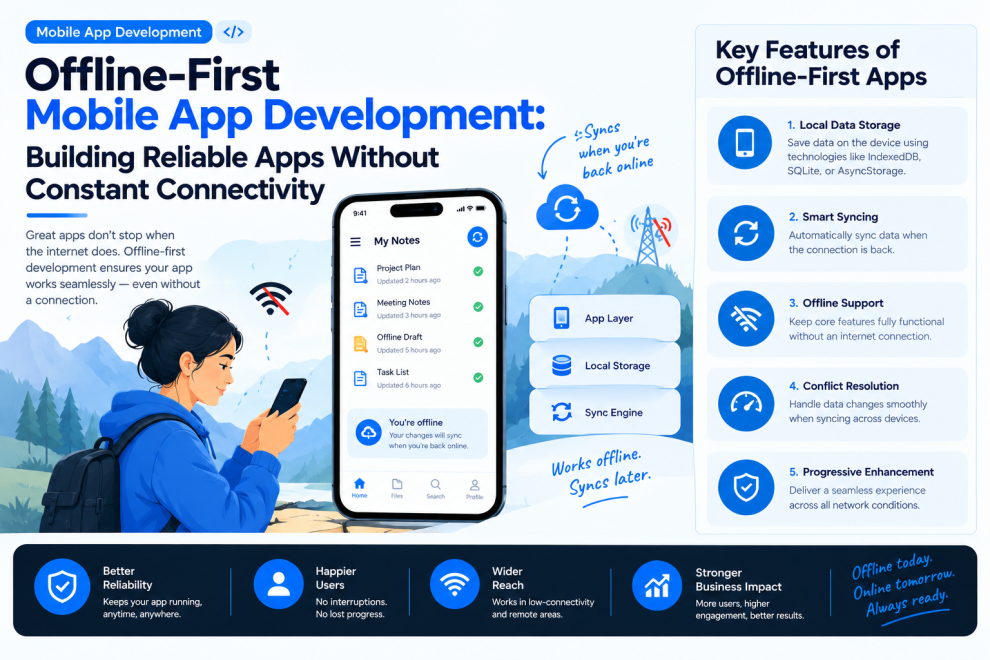
Offline-first mobile app development addresses this challenge by allowing essential app functionality to continue even when the network is unavailable. Rather than treating offline access as an exception, the application is designed around the assumption that connectivity can change at any moment.
What Is Offline-First Mobile App Development?
An offline-first application prioritizes local data access and interaction wherever practical. The app stores necessary information on the device, allows supported actions to continue offline, and synchronizes changes with a backend when connectivity returns.
This differs from simply displaying a cached screen. A well-designed offline-first app can preserve user input, manage pending operations, and communicate clearly about which actions have or have not synchronized.
Common use cases include field-service applications, travel apps, inventory systems, retail apps, healthcare workflows, and productivity tools.
Key Components of an Offline-First Architecture
1. Local Data Storage
A local database or persistent storage layer allows the app to retrieve important information without making a network request every time.
The choice depends on the data model, platform, security requirements, and expected workload. Structured records may benefit from a local database, while smaller settings and preferences may use simpler storage mechanisms.
Sensitive information requires additional consideration, including appropriate access controls, encryption where warranted, and clear data-retention policies.
2. A Clear Source-of-Truth Strategy
Applications need a defined approach to determining which data should be displayed and how local changes relate to server-side records.
For many products, the local database serves as the primary source for the interface, while synchronization updates it with server changes. This can keep screens responsive and reduce unnecessary loading states.
The exact strategy should reflect whether the app handles collaborative records, financial transactions, rapidly changing inventory, or other data where consistency is critical.
3. Reliable Synchronization
Synchronization moves changes between the device and the backend. It should account for interrupted requests, duplicate submissions, retries, and changes made on other devices.
A robust implementation typically needs:
- A queue of pending operations.
- Retry logic with sensible backoff.
- Idempotent server operations where appropriate.
- Clear handling of expired sessions and authorization failures.
- Background synchronization where platform capabilities and permissions allow it.
Developers should not assume that a network connection guarantees that a request will succeed.
4. Conflict Resolution
Conflicts occur when the same record changes locally and remotely before synchronization completes.
A simple “last write wins” approach may be acceptable for low-risk preferences, but it can silently overwrite important work. Other situations require field-level merging, version checks, user confirmation, or a server-defined resolution policy.
The right strategy depends on the consequences of losing or overwriting data. Financial records and inventory adjustments, for instance, may need stronger consistency controls than a personal draft.
5. Honest Offline Status and User Feedback
Users should understand whether their actions are saved locally, waiting to synchronize, or confirmed by the server.
Useful interface states include:
- Saved on this device.
- Waiting to sync.
- Synchronization in progress.
- Changes synchronized.
- Action needs attention.
Avoid showing a success message that implies a server-side operation is complete when the action is only queued locally.
A Practical Workflow for Building Offline-First Apps
Step 1: Identify Essential Offline Tasks
Start by deciding which user journeys must continue without connectivity. A field technician may need to view assigned jobs and record inspection results, while a travel user may need access to saved bookings and itinerary details.
Not every feature needs to work offline. Define the minimum useful offline experience based on actual user needs.
Step 2: Define Data Ownership and Freshness
Determine which data can be cached, which can be edited offline, how long cached information remains valid, and which actions require server confirmation.
This is especially important for data that changes frequently or has legal, financial, or operational consequences.
Step 3: Design for Interrupted Connectivity
Simulate network loss during reads, writes, uploads, and synchronization. Preserve user input and make retry behavior predictable.
The app should also handle transitions between connection states without unnecessarily discarding work or blocking unrelated actions.
Step 4: Test Synchronization and Conflicts
Test scenarios involving multiple devices, duplicate requests, delayed responses, expired authentication, and conflicting edits.
Include realistic cases in which users remain offline for extended periods and reconnect with a large backlog of pending changes.
Step 5: Monitor Real-World Reliability
Track synchronization failures, queue delays, retry counts, conflict rates, and the percentage of offline actions that eventually complete successfully.
Monitoring should avoid collecting unnecessary personal information. Operational telemetry should be designed with privacy and data minimization in mind.
Common Challenges and How to Address Them
Stale information: Show when important data was last updated and define freshness rules for critical records.
Duplicate actions: Use idempotency keys or equivalent backend safeguards for operations that must not be applied twice.
Storage constraints: Set cache limits and define which records should be retained or removed.
Security risks: Protect sensitive local data, manage authentication expiration, and avoid treating offline access as permission to bypass server-side authorization.
Complex synchronization: Start with a clearly scoped offline workflow before expanding to bidirectional synchronization across multiple devices.
Choosing the Right Technology
Native iOS and Android development can offer fine-grained control over storage, background tasks, and platform behavior. Cross-platform frameworks such as Flutter and React Native can also support offline-first patterns, provided that local persistence, synchronization, and platform-specific constraints are addressed appropriately.
Technology choice should follow the product’s requirements—not the assumption that one framework automatically solves offline reliability.
Conclusion
Offline-first mobile app development helps applications remain useful when connectivity is inconsistent. The foundation is not merely caching data; it is a thoughtful architecture for local persistence, synchronization, conflict resolution, security, and user communication.
By defining essential offline workflows early and testing real-world failure scenarios, product teams can build mobile experiences that protect user progress and behave predictably when the network cannot be trusted.



Add Comment