


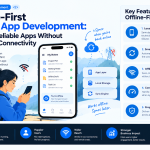

Mobile applications are often used in environments where internet connectivity is unreliable. Field workers may operate in remote locations, travelers may lose access to mobile data, and customers may need to review information while commuting or working indoors with poor reception.
An application that stops working whenever the network becomes unavailable can interrupt important tasks and frustrate users. Offline-first mobile app development addresses this challenge by designing applications to remain useful even when a connection is missing or unstable.
Instead of treating offline support as an optional feature, an offline-first approach makes local data access, synchronization, and recovery part of the application’s architecture.
For businesses building mobile products, this approach can improve reliability, support field operations, and create more consistent user experiences across different network conditions.
What Is Offline-First Mobile App Development?
Offline-first development is an approach in which an application can perform essential operations using locally available data and synchronize changes with a remote server when connectivity becomes available.
In a conventional online-dependent application, many actions require a successful server request before the user can proceed. In an offline-first application, supported actions can often continue using a local database or cached information.
For example, a field-service technician might record inspection results without internet access. The application saves the information locally and uploads it when a connection becomes available.
Offline-first does not mean that every feature must work without the internet. Features such as live payments, real-time collaboration, or remote account verification may still require connectivity. The key is to identify which tasks can safely continue offline and communicate limitations clearly.
How Offline-First Architecture Works
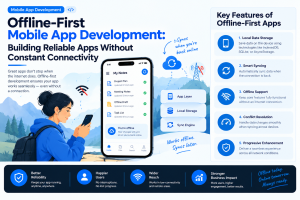
A typical offline-first mobile application includes several interconnected components.
1. Local Data Storage
The application stores the information needed for offline access on the device.
Depending on the platform and requirements, developers may use SQLite, Room on Android, Core Data on Apple platforms, or another suitable local persistence solution.
Local storage allows the application to display previously synchronized data and save supported user actions when the network is unavailable.
2. Data Access Layer
A repository or data-access layer determines how the application reads and writes information.
In many offline-first designs, the local database serves as the primary source for the user interface. Server responses update the local database, and the interface reflects those changes.
This approach can reduce the need for separate online and offline screen implementations.
3. Synchronization Engine
The synchronization engine transfers local changes to the server and retrieves updates made elsewhere.
It needs to manage pending operations, retry failed requests, detect conflicts, and handle interruptions without losing data or duplicating actions.
Synchronization should be designed as a reliable process rather than a single request triggered when the network returns.
4. Remote API and Server
The backend remains responsible for server-side validation, permissions, shared data, and other authoritative operations.
The application must not assume that locally stored information is automatically valid or that an offline action has already been accepted by the server.
5. Connectivity and State Management
The application monitors network conditions and tracks the status of local changes.
Useful states may include:
- Saved locally.
- Waiting to sync.
- Synchronization in progress.
- Synced successfully.
- Synchronization failed.
- Conflict requiring resolution.
Clear state management helps users understand what has happened to their information.
Benefits of Offline-First Mobile Apps
1. Better Reliability
Offline-first applications can continue supporting essential workflows when internet connectivity is lost.
This is particularly useful for inventory systems, logistics applications, field-service tools, healthcare workflows, and other products used in environments with inconsistent connectivity.
2. Faster User Experiences
Reading information from local storage can be faster than waiting for a remote server response.
For frequently accessed data, local reads can reduce perceived latency and make navigation feel more responsive.
3. Improved Productivity
Employees working in warehouses, rural locations, construction sites, or other connectivity-challenged environments can continue recording information instead of waiting for a stable connection.
The productivity benefit depends on which tasks the application supports offline and how well it handles synchronization.
4. More Consistent User Experiences
An application designed for offline use can provide predictable behavior across different network conditions.
Users do not have to learn a completely different workflow whenever their connection drops. Instead, the interface can explain which actions are available and which are waiting for synchronization.
5. Reduced Dependence on Continuous Connectivity
Offline-first applications can reduce the number of interactions that must wait for immediate network responses.
This does not eliminate backend or data-transfer costs, but it can improve efficiency when local reads and batched synchronization are appropriate.
Key Challenges in Offline-First Development
Offline-first architecture introduces complexity that teams should address early.
Data Synchronization
The application must decide when to synchronize, which changes to send, and how to recover from interrupted requests.
Poor synchronization logic can result in missing updates, duplicated records, or inconsistent data between devices.
Conflict Resolution
Conflicts occur when the same record changes in multiple places before synchronization completes.
For example, two employees might update the same customer record while offline. When both devices reconnect, the system needs a defined policy for handling the competing changes.
Storage Limitations
Mobile devices have finite storage capacity. Developers need to decide which information to store locally, how long to retain it, and how to remove outdated data safely.
Security and Privacy
Local databases can contain sensitive information even when the device is offline. Data protection must cover local storage, authentication, backups, device loss, and synchronization.
User Expectations
Users may assume that an action saved locally has already been completed on the server.
The interface must distinguish between a locally saved change and an operation that has been synchronized or confirmed by the backend.
8 Best Practices for Building Offline-First Mobile Apps
1. Identify Essential Offline Workflows
Begin by defining what users must be able to do without a connection.
For a field-service application, this might include viewing assigned jobs, recording inspection results, and attaching notes. Live payment processing or remote identity verification may remain online-only.
Prioritize workflows based on user needs instead of attempting to replicate every online feature offline.
2. Make Local Storage Part of the Core Architecture
Design the data layer around reliable local persistence from the beginning.
For many applications, the user interface reads from a local database while background processes update that database from server responses. This can help maintain consistent behavior across online and offline states.
Choose storage technology based on data volume, query requirements, platform support, and security needs.
3. Build a Reliable Synchronization Strategy
A robust synchronization process should:
- Track pending local changes.
- Retry transient failures using appropriate backoff.
- Avoid duplicate operations through idempotency where applicable.
- Handle partial synchronization.
- Record enough state to resume after an interruption.
- Communicate persistent failures to users when action is needed.
Do not rely solely on a single connectivity event to synchronize all pending data. Mobile applications may be suspended, closed, or disconnected during the process.
4. Define Conflict-Resolution Rules
Choose a conflict strategy that matches the data and business requirements.
Possible approaches include:
- Last-write-wins: The most recent accepted update replaces an earlier value, where timestamps and semantics make this appropriate.
- Field-level merging: Non-conflicting changes to different fields are combined.
- Manual resolution: Users review competing changes and choose the correct version.
- Business-rule resolution: The server applies domain-specific rules to determine the authoritative result.
Last-write-wins is not suitable for every situation. Financial records, inventory quantities, and other critical data may require stronger transaction or reconciliation logic.
5. Communicate Sync Status Clearly
<AsyncImage query=”mobile app offline mode syncing pending changes status indicator UI design smartphone screen” aspectRatio=”16:9″ width=”100%” />
Users should be able to understand whether their work has been saved and whether it has reached the server.
Useful interface messages include:
- “Saved on this device.”
- “Waiting for connection.”
- “Syncing changes.”
- “All changes synced.”
- “Unable to sync. Try again.”
Avoid showing a successful server-confirmation message when the information has only been stored locally.
6. Design for Data Security
Offline support should not weaken security.
Depending on the sensitivity of the application, use appropriate encryption, secure key storage, access controls, device-level protection, and retention policies. Avoid storing sensitive information that does not need to be available offline.
The backend must still validate permissions and business rules when changes are synchronized.
7. Manage Background Synchronization Carefully
Mobile operating systems limit background execution to preserve battery life and system resources.
Use platform-supported scheduling and background-processing mechanisms, and design synchronization so it can resume after being interrupted.
For time-sensitive operations, explain any limitations instead of promising that every change will sync immediately.
8. Test Realistic Failure Scenarios
Offline behavior should be tested deliberately, not just by switching on airplane mode once.
Test scenarios such as:
- Connectivity dropping while a request is in progress.
- The device being restarted with pending changes.
- Multiple devices editing the same record.
- Authentication expiring before synchronization.
- The server rejecting an offline change.
- Storage running low.
- A synchronization process being interrupted.
- Connectivity returning briefly and then disappearing again.
These tests help expose data-loss and consistency issues before release.
Offline-First vs. Online-Only Mobile App Development
| Consideration | Offline-first | Online-only |
|---|---|---|
| Connectivity | Supports defined workflows without a connection | Most operations depend on a live connection |
| Local data | Requires deliberate local persistence | May use limited caching |
| Synchronization | Needs synchronization and conflict handling | Fewer offline synchronization requirements |
| User experience | Can support more continuous workflows | May be simpler when connectivity is reliable |
| Development complexity | Generally higher for data-heavy workflows | Often lower for straightforward applications |
| Best use cases | Field work, travel, inventory, note-taking | Live services and workflows requiring immediate server validation |
The best approach depends on the product. Some applications benefit from a hybrid model in which browsing and drafting work offline, while sensitive or time-critical operations require a live connection.
Which Industries Benefit From Offline-First Mobile Apps?
Field Service and Maintenance
Technicians can view assigned work, capture inspection results, and record maintenance activities at locations with weak connectivity.
Logistics and Inventory
Warehouse staff and delivery teams can record scans, item movements, and delivery confirmations for synchronization when the network is available.
Healthcare
Authorized healthcare professionals may need access to selected patient information and the ability to record approved workflows in connectivity-limited settings. Offline clinical data requires especially careful security, freshness indicators, access controls, and reconciliation.
Travel and Tourism
Travel applications can provide downloaded itineraries, tickets, maps, and other information when users cannot access mobile data.
Education
Learning applications can make selected lessons, reading material, and practice activities available without continuous connectivity.
Financial Services
Some financial applications can support offline access to limited information or draft actions. Transactions that require real-time authorization, current balances, or fraud checks should not be represented as completed before server confirmation.
How Much Does Offline-First Mobile App Development Cost?
The cost depends on the application’s features, data model, synchronization requirements, security needs, and platform scope.
A simple application with locally stored notes is considerably different from a multi-user inventory system that synchronizes thousands of records and resolves concurrent updates.
Key cost factors include:
- Local database design and migration.
- Synchronization and retry mechanisms.
- Conflict-resolution logic.
- Backend API changes.
- Offline interface states.
- Security and data retention.
- Testing across network and device conditions.
- Long-term monitoring and maintenance.
Rather than treating offline support as a single feature, businesses should request an estimate based on specific offline workflows and data-consistency requirements.
Final Thoughts
Offline-first mobile app development helps applications remain useful when connectivity is unreliable. It can improve responsiveness, support field operations, and make important workflows more dependable.
However, delivering a strong offline experience requires careful architecture. Local persistence, reliable synchronization, conflict resolution, security, and clear status messages all need to work together.
Businesses should identify the workflows that matter most, decide which actions require server confirmation, and test how the application behaves when connections fail or return unexpectedly.
The objective is not to make every feature available offline. It is to ensure that users can complete essential tasks safely and understand exactly what has been saved, synchronized, or left pending.
Frequently Asked Questions
What is offline-first mobile app development?
Offline-first development allows an application to perform selected tasks using locally available data, then synchronize changes with a server when connectivity returns.
Which database is best for offline-first apps?
The choice depends on the platform and requirements. Options include SQLite, Room, Core Data, and other local persistence technologies. Data structure, query needs, security, and synchronization requirements should guide the decision.
How do offline-first apps synchronize data?
They typically store pending changes locally, retry synchronization when conditions allow, and reconcile server responses with local records. Reliable implementations also handle duplicate operations, interrupted transfers, and conflicts.
What happens when two devices edit the same record offline?
The application applies a predefined conflict-resolution strategy. Depending on the data, this may involve merging changes, applying business rules, or asking a user to resolve the conflict.
Are offline-first mobile apps secure?
They can be secure when local data storage, device access, encryption, authentication, retention, and server-side authorization are designed appropriately. Offline functionality does not remove the need for security controls.
Does every mobile app need offline support?
No. Offline-first architecture is most valuable when users need reliable access to information or the ability to complete essential tasks without continuous connectivity. Some applications are better served by a simpler online-dependent design.




Add Comment