



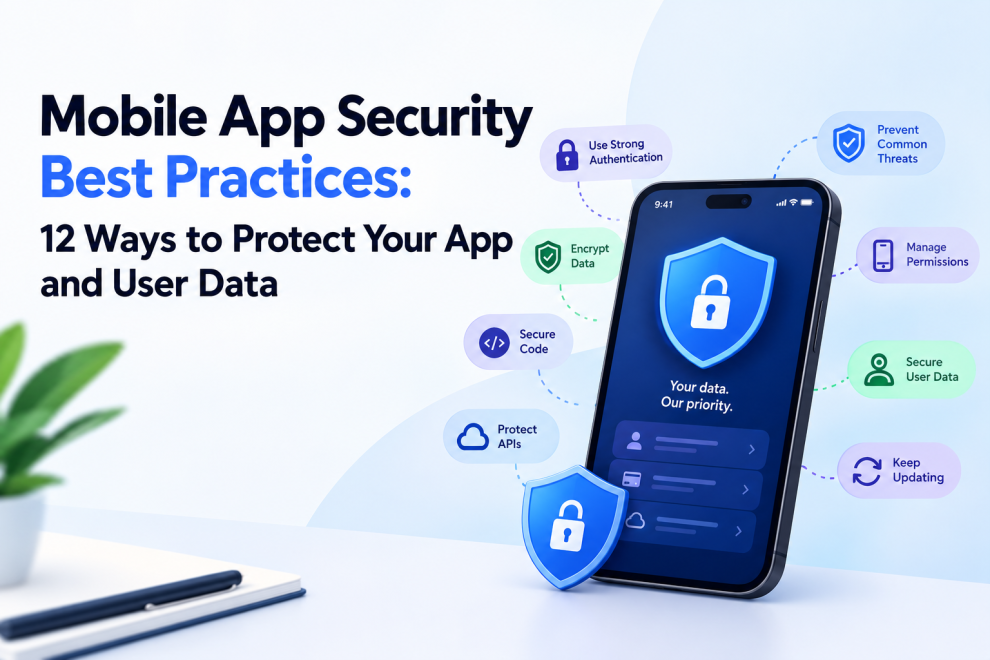

Mobile applications frequently handle personal information, account credentials, payments, location data, and business records. A security weakness can expose sensitive information, disrupt services, damage customer trust, and create costly operational problems.
Security should therefore be part of mobile app development from the planning stage—not an audit performed only before launch.
Whether you are building a fintech product, ecommerce application, healthcare platform, or enterprise mobile app, a structured security approach helps reduce risk throughout the development lifecycle.
This guide covers 12 mobile app security best practices that development teams should consider when designing, building, testing, and maintaining iOS and Android applications.
Why Is Mobile App Security Important?
Mobile applications operate in environments that developers cannot fully control. Users may connect through untrusted networks, install applications on compromised devices, grant unexpected permissions, or use older app versions.
At the same time, mobile apps often depend on backend APIs, third-party SDKs, authentication providers, and external services. Weaknesses in any of these components can affect the overall security of the product.
A secure application requires multiple layers of protection. No single measure, including encryption or biometric authentication, can eliminate every risk.
12 Mobile App Security Best Practices
1. Use Secure Authentication
Authentication should verify user identity without introducing unnecessary friction.
Use established authentication protocols and secure session management. Where appropriate, consider passkeys, multifactor authentication, or risk-based verification for sensitive actions.
Authentication requirements should reflect the app’s risk profile. A financial transaction may need stronger verification than viewing non-sensitive public content.
2. Store Sensitive Data Securely
Avoid storing sensitive information on a device unless it is necessary for the product to function.
Use platform-appropriate secure storage mechanisms for credentials and cryptographic material, such as iOS Keychain and Android Keystore-backed solutions. Do not store passwords, long-lived access tokens, or secret keys in plain-text preferences, logs, or bundled source code.
Remember that secure storage reduces risk but does not make every device or application environment invulnerable.
3. Encrypt Data in Transit and at Rest
Use HTTPS with properly configured TLS to protect communication between the app and its backend.
Sensitive data stored locally or on servers should receive appropriate protection based on the threat model, legal obligations, and operational requirements.
Encryption keys must be managed securely. Hardcoding a secret into a mobile application is not a reliable way to keep it confidential because application packages can be inspected.
4. Secure Backend APIs
A mobile app’s interface is not a security boundary. Attackers may interact directly with its APIs, bypassing the intended screens and workflows.
Validate authorization and permissions on the server for every sensitive operation. Enforce appropriate input validation, rate limits, request controls, and monitoring.
For example, an API must verify that a user is authorized to view or modify a particular booking rather than trusting an account ID supplied by the client.
5. Follow the Principle of Least Privilege
Applications should request only the device permissions they genuinely need.
If an app provides navigation, location access may be necessary. If a feature works without access to contacts or the microphone, avoid requesting those permissions unnecessarily.
Explain permission requests in context and give users reasonable control over their choices. On the backend, apply the same principle by limiting access to data and administrative functions.
6. Protect Authentication Sessions
Secure session handling helps prevent unauthorized access after login.
Use appropriately short-lived access tokens where practical, manage refresh tokens carefully, and invalidate sessions when required. Avoid placing sensitive tokens in URLs or logging them during troubleshooting.
For high-risk products, consider additional checks for sensitive operations and clear procedures for revoking compromised sessions.
7. Validate All Inputs
Applications should not assume that data received from a mobile client is trustworthy.
Validate inputs on both the client and server, with server-side validation enforcing the actual security rules. Use parameterized database operations and safe handling of uploaded files to reduce common injection and data-processing risks.
Validation should cover unexpected values, malformed requests, oversized inputs, and unauthorized state changes.
8. Review Third-Party SDKs and Dependencies
Mobile apps often rely on libraries for analytics, crash reporting, payments, advertising, authentication, and other features.
These dependencies can introduce vulnerabilities, privacy concerns, or compatibility problems. Maintain an inventory of important packages, update them responsibly, and review their permissions and data collection behavior.
Only include SDKs that provide clear value, and understand what information they transmit.
9. Avoid Exposing Secrets in the App
Never treat a mobile application’s bundled code as a secure location for confidential server credentials.
API keys that are designed to be public still need appropriate restrictions, such as platform, application, or usage controls where supported. Private credentials should remain on trusted backend systems.
Code obfuscation can raise the effort required to inspect an app, but it does not replace proper secret management or server-side authorization.
10. Test for Security Vulnerabilities
Security testing should occur throughout development rather than only at the end.
Useful practices include:
- Static analysis and dependency scanning.
- Dynamic testing of running applications.
- API authorization and access-control testing.
- Review of local data storage and network communication.
- Manual testing of sensitive workflows.
- Threat modeling for high-risk features.
- Penetration testing appropriate to the application’s risk.
Teams can use the OWASP Mobile Application Security Verification Standard (MASVS) and associated testing guidance to structure their assessment.
11. Minimize Sensitive Data in Logs and Analytics
Logs can accidentally expose authentication tokens, personal information, payment details, or private user activity.
Define what the application is allowed to record, remove sensitive values from diagnostic messages, and restrict access to telemetry systems.
Analytics should collect only the information needed for legitimate product or operational purposes. Apply suitable retention periods and access controls.
12. Keep the App Updated and Monitor Risks
Security is an ongoing responsibility after release.
Monitor relevant dependency advisories, backend vulnerabilities, suspicious activity, authentication failures, and reports from users or security researchers. Establish a process for prioritizing fixes and releasing updates.
A plan for handling security incidents should identify responsible owners, escalation procedures, communication requirements, and recovery steps.
Common Mobile App Security Mistakes
Development teams should be particularly careful to avoid:
- Storing sensitive credentials in plain text.
- Relying on client-side checks to enforce authorization.
- Embedding private server secrets in application packages.
- Sending sensitive information through unprotected connections.
- Requesting unnecessary permissions.
- Ignoring third-party dependency vulnerabilities.
- Logging personal data or authentication tokens.
- Treating a successful app store review as proof of security.
These issues are easier to address when security requirements are defined before implementation and verified during testing.
Mobile App Security for iOS vs Android
Both iOS and Android provide security capabilities, but implementation details differ.
On iOS, teams should understand Keychain, application sandboxing, platform permission controls, and appropriate handling of credentials and sensitive files.
On Android, developers should consider Keystore-backed cryptographic operations, application permissions, secure component configuration, and protection against insecure data exposure.
For both platforms, the backend remains critical. Secure device storage and platform controls do not replace server-side authorization, secure APIs, monitoring, or sound application architecture.
How to Build a Mobile App Security Checklist
Before release, confirm that the team has addressed the following areas:
- Authentication and session management have been reviewed.
- Sensitive local data is minimized and appropriately protected.
- Network traffic uses secure transport.
- Backend APIs enforce authorization independently of the client.
- Third-party libraries and SDKs have been reviewed.
- Secrets are not embedded as private credentials in the application.
- Security testing has covered critical workflows.
- Logs and analytics avoid unnecessary sensitive data.
- A process exists for patches, incident response, and ongoing monitoring.
For applications handling financial, healthcare, or other regulated information, map these controls to the applicable legal, regulatory, and industry-specific requirements.
Conclusion
Mobile app security depends on coordinated decisions across design, development, infrastructure, testing, and maintenance. Secure authentication, protected data storage, API authorization, dependency management, and continuous testing all help reduce risk.
The strongest security approach starts early, applies controls according to the application’s threat model, and verifies that protections continue to work after launch.
By treating security as a core product requirement rather than a final checklist, businesses can build mobile applications that are more resilient and better equipped to protect user data.



Add Comment