



A mobile app can have an excellent interface and powerful backend, but what happens when the internet connection disappears?
For users traveling through areas with poor coverage, commuting through tunnels, working remotely, or using unstable networks, a connection-dependent application can quickly become frustrating.
This is where offline-first mobile app development becomes important.
Instead of treating offline functionality as an emergency fallback, an offline-first approach considers limited connectivity as part of the product experience from the beginning.
What Is Offline-First App Development?
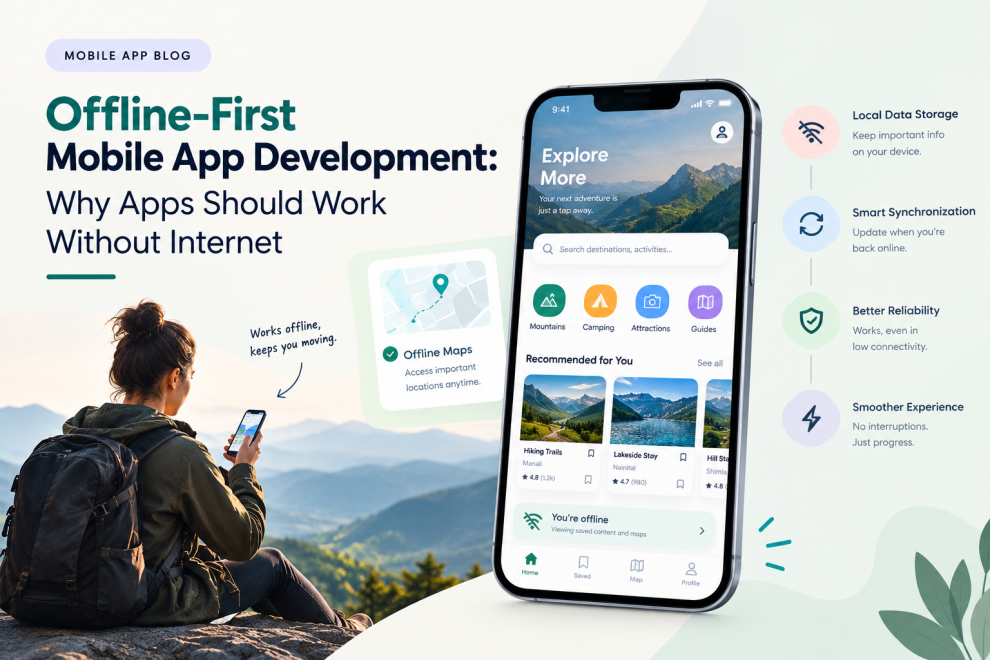
An offline-first application is designed so that important functionality can continue working when the device has limited or no internet connectivity.
The app can store relevant information locally and synchronize changes with the backend when connectivity becomes available again.
A simplified flow looks like:
User Action → Local Data → Immediate App Response → Network Available → Synchronization
This can make applications feel faster and more resilient.
Why Offline Functionality Matters
Internet connectivity is not guaranteed everywhere.
Users may experience poor connectivity while:
- Traveling
- Using public transportation
- Working in remote locations
- Entering buildings
- Flying
- Moving between networks
- Using congested mobile networks
An application that handles these situations gracefully can provide a much more reliable experience.
1. Local Data Storage
Offline-first apps often need a local data layer.
Depending on the application, this can store:
- User preferences
- Recent content
- Documents
- Product information
- Messages
- Maps
- Drafts
- Previously accessed records
The app can decide which information should remain available locally.
Not every piece of backend data needs to be downloaded to the device.
2. Offline Actions
A strong offline experience does not simply allow users to read information.
In some applications, users should also be able to perform actions.
For example, a field-service application could allow an employee to complete a job form without connectivity.
The action can be stored locally and synchronized later.
3. Data Synchronization
Synchronization is one of the most important technical challenges.
When connectivity returns, the application needs to determine:
- What changed locally?
- What changed on the server?
- Which version should be retained?
- Are there conflicts?
- What should happen if synchronization fails?
The synchronization strategy should be designed around the application’s data model.
4. Handling Conflicts
Consider a collaborative application where two users modify the same record while one device is offline.
When the device reconnects, the system may discover conflicting changes.
The application needs a defined conflict-resolution strategy.
Depending on the product, this could involve:
- Latest-update rules
- Field-level merging
- Server-side resolution
- User confirmation
- Version tracking
There is no universal approach.
The right strategy depends on how important the data is and how users interact with it.
5. Clear Connectivity States
Users should know when the application is offline.
But an offline state should not necessarily look like an error.
A simple message such as:
“You’re offline. Changes will sync when you’re connected.”
can provide reassurance.
The interface should also communicate when synchronization is complete.
6. Offline-First Is Not the Same as Offline-Only
The objective is not to remove the internet requirement entirely.
Most modern applications still rely on backend services for:
- Authentication
- Cloud data
- Payments
- Real-time communication
- Analytics
- Security
- Synchronization
Offline-first design determines which parts of the experience can continue when those services are temporarily unavailable.
7. Apps That Can Benefit From Offline Support
Offline capabilities can be especially useful for:
Travel Apps
Users may need access to itineraries, tickets, maps, addresses, and reservations when connectivity is limited.
Field-Service Apps
Workers can record information at job sites where network coverage may be unreliable.
Productivity Apps
Users can continue writing notes, managing tasks, or working on documents before synchronization.
Logistics Apps
Drivers and warehouse teams may need to record operational information during network interruptions.
Education Apps
Students can access downloaded learning materials without continuously relying on a connection.
Offline Maps and Location
Location-based applications can combine local map data with device GPS.
This can allow users to navigate or access saved locations even when the network is unavailable.
However, offline map functionality can require substantial local storage and careful data management.
Offline Payments Require Special Consideration
Not every feature should automatically work offline.
Payment processing, financial transactions, and other sensitive operations may require a live connection or additional security mechanisms.
Developers should clearly separate:
Actions that can safely be queued offline
from
Actions that require immediate server verification
This distinction is particularly important for financial and transactional applications.
Security in Offline Apps
Storing data locally introduces additional security considerations.
Developers need to consider:
- Encryption
- Secure storage
- Authentication
- Session management
- Device security
- Data expiration
- Sensitive information handling
A device may be lost or accessed by someone other than the intended user.
Offline functionality should therefore not mean storing unlimited sensitive information locally.
Offline-First Can Improve Performance
Offline architecture is not only about poor connectivity.
Local data can also make an application feel faster.
Instead of waiting for a network request every time a user opens a screen, the app can display locally available information immediately and update it in the background.
This can create a more responsive experience.
Designing an Offline-First Architecture
A typical architecture may contain:
Mobile UI
↓
Local Data Layer
↓
Synchronization Engine
↓
API Layer
↓
Backend Services
↓
Database
The exact architecture depends on the application.
Some products may use local databases, caching layers, background synchronization, event queues, or other mechanisms to manage offline behavior.
Test More Than the Happy Path
Offline functionality needs dedicated testing.
Teams should test situations such as:
- Connection lost during an action
- Connection restored after several hours
- Multiple offline changes
- Conflicting updates
- Failed synchronization
- Partial synchronization
- Device restart
- Low storage
- Expired authentication
Testing these scenarios early can prevent difficult production issues.
Build Offline Capabilities Around Real User Needs
Not every app needs complete offline functionality.
The important question is:
Which tasks must users be able to complete when connectivity is unavailable?
For one product, that might be reading previously downloaded content.
For another, it might be creating records or completing field work.
The offline strategy should be based on those critical journeys.
Final Thoughts
Offline-first mobile app development can make applications more resilient, responsive, and useful in real-world conditions.
The approach combines local storage, synchronization, conflict handling, connectivity-aware UX, and careful security practices.
It is particularly valuable for applications used while traveling, working remotely, operating in the field, or dealing with unreliable networks.
Companies such as GeekyAnts work across mobile app development, UI/UX, backend engineering, and AI-powered product engineering, allowing offline requirements to be considered as part of the broader product architecture.
The goal is not simply to make an app work without internet.
It is to make sure that a temporary loss of connectivity does not unnecessarily stop the user’s work.
SEO Metadata
SEO Title:
Meta Description:
Keywords:



Add Comment