






Mobile applications are becoming more interactive as artificial intelligence introduces new ways for users to communicate with digital products. Instead of relying exclusively on typing, users can increasingly speak commands, upload images, share documents, and combine different forms of input to complete tasks.
This approach is known as multimodal AI.
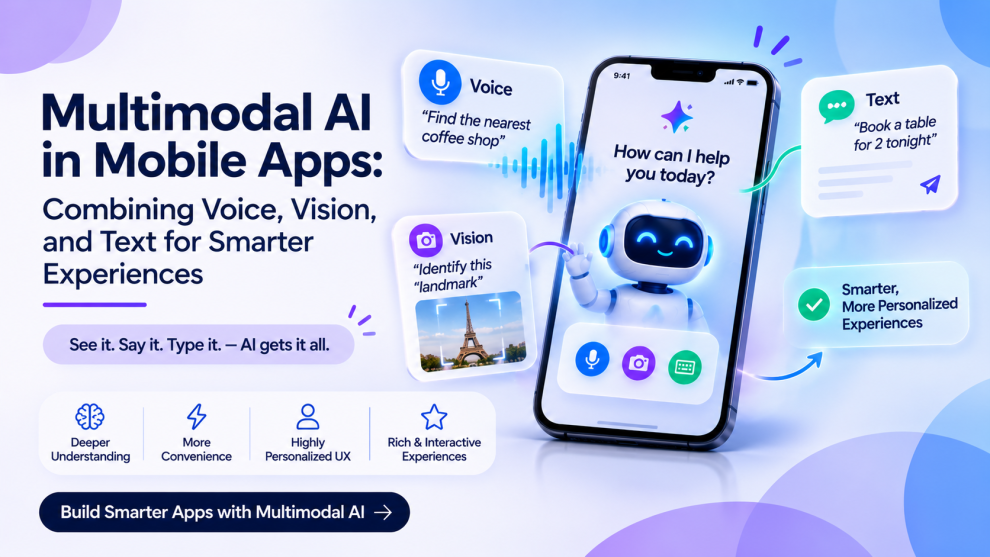
Multimodal AI allows applications to process and combine information from different sources, such as text, images, audio, and video. It can help mobile applications understand more complex requests and provide responses that are relevant to the user’s context.
For businesses building AI-powered mobile products, multimodal capabilities create opportunities across healthcare, banking, eCommerce, education, travel, and enterprise software.
This article explores how multimodal AI works in mobile applications, its practical use cases, technical architecture, benefits, and implementation challenges.
What Is Multimodal AI in Mobile App Development?
Multimodal AI refers to artificial intelligence systems that can process, interpret, or generate information across multiple data types.
Traditional AI applications may focus on a single input type. For example, a text-based chatbot primarily processes written instructions.
A multimodal application can combine different forms of information.
Consider a travel application. A user could upload a photograph of a destination, ask a voice question about nearby attractions, and receive a text-based itinerary with relevant recommendations.
The application combines visual input, speech recognition, language understanding, and generated responses to support one user goal.
Common modalities include:
- Text: Written prompts, descriptions, messages, and documents.
- Voice: Spoken instructions, questions, and audio recordings.
- Images: Photographs, screenshots, product images, and scanned documents.
- Video: Recorded visual information and selected video frames.
- Structured data: Application records, sensor information, and API responses.
Not every multimodal application needs all these capabilities. Developers should select modalities based on the actual tasks users need to complete.
How Multimodal AI Works in a Mobile Application
A multimodal mobile application typically combines the mobile interface, AI models, backend services, and data-processing components.
A simplified workflow includes the following steps:
Step 1: Capture User Input
The application collects information through supported input methods.
For example, users may:
- Speak into the device microphone.
- Capture a photograph using the camera.
- Upload a document.
- Enter a written instruction.
- Share multiple inputs together.
Step 2: Process Different Input Types
The application prepares the incoming information for the relevant AI model or service.
This may involve speech recognition, image preprocessing, document extraction, or audio transcription.
Step 3: Understand User Intent
The AI system interprets the available information and identifies what the user is trying to accomplish.
It may combine the spoken instruction with visual context to understand the complete request.
Step 4: Generate a Response
The system produces an appropriate response, which may include text, structured information, generated images, or spoken output.
Step 5: Connect With Application Services
Where necessary, the application can retrieve information from approved backend systems and external APIs.
For example, an eCommerce app may identify a product in an uploaded image and retrieve matching product information from its catalog.
Step 6: Display the Result
The mobile interface presents the output in a useful format.
This could include a text explanation, visual comparison, audio response, or interactive result screen.
The application should also communicate when information is incomplete or requires verification.
Top Use Cases of Multimodal AI in Mobile Applications
1. Visual Search in eCommerce Applications
Multimodal AI can make product discovery easier by allowing customers to search using photographs instead of relying entirely on written descriptions.
A customer could upload a picture of a pair of shoes and ask for similar products within a specific price range.
The application could:
- Identify visual product characteristics.
- Match images against catalog information.
- Apply user-defined filters.
- Retrieve product availability.
- Present comparable options.
This can make product discovery more intuitive, especially when users do not know the exact product name.
2. Voice-Enabled Banking Applications
Banking applications can use voice and text-based AI to help users understand account information and navigate financial services.
Potential capabilities include:
- Asking questions about spending summaries.
- Finding previous transactions.
- Understanding financial terminology.
- Locating banking features.
- Receiving spoken explanations.
For security reasons, sensitive operations such as payments and account changes should require appropriate authentication and explicit confirmation.
3. Healthcare Applications
Healthcare applications can use multimodal AI to support information organization and administrative workflows.
Potential applications include:
- Voice-based appointment assistance.
- Document and report summarization.
- Extraction of information from uploaded records.
- Accessible explanations of approved healthcare information.
- Communication support for patients.
Clinical interpretation and medical decisions require appropriate validation and professional oversight. AI-generated explanations should not be presented as a substitute for qualified medical advice.
4. AI-Powered Travel Applications
Travel applications can combine visual, audio, and text inputs to make travel planning more interactive.
For example, a traveler could photograph a landmark and ask for its history or request nearby attractions through voice input.
Potential features include:
- Visual destination discovery.
- Voice-based travel assistance.
- Multilingual communication support.
- Image-assisted itinerary planning.
- Contextual recommendations.
Availability, pricing, and booking details should be retrieved from appropriate travel services rather than assumed from generated responses.
5. Education and Learning Applications
Multimodal AI can support different learning preferences by combining written explanations, spoken instructions, and visual information.
A student could photograph a mathematical problem and ask for a step-by-step explanation.
Other use cases include:
- Voice-based language practice.
- Image-assisted learning.
- Interactive study assistance.
- Audio summaries.
- Document question answering.
Educational applications should make it possible for students to review explanations and identify when generated information needs verification.
6. Enterprise and Productivity Applications
Enterprise mobile apps can use multimodal AI to help employees interact with business information.
For example, a field employee could photograph equipment, dictate an inspection note, and generate a structured maintenance report.
Other applications include:
- Voice-based task creation.
- Document extraction.
- Meeting and audio summaries.
- Visual inspection assistance.
- Search across enterprise documents.
Access to enterprise information should follow the organization’s existing permission structure.
Key Technologies Behind Multimodal AI Mobile Apps
Developers need different technical components depending on the input and output types supported by the application.
Speech Recognition
Speech recognition converts spoken language into text or structured information.
It supports voice search, voice commands, transcription, and conversational interactions.
Natural Language Processing
Natural language processing helps systems interpret written and spoken instructions, identify intent, and generate relevant responses.
Computer Vision
Computer vision allows applications to analyze photographs, detect objects, recognize visual patterns, and extract information from images.
Optical Character Recognition
OCR extracts text from images and scanned documents.
It is useful in applications that process invoices, receipts, forms, and identity documents.
Text-to-Speech
Text-to-speech converts written responses into spoken audio.
This can improve accessibility and support hands-free interaction.
Multimodal Foundation Models
Multimodal models can process multiple input types within a unified model or coordinated model workflow.
Depending on the provider and architecture, they may support combinations of text, audio, image, and video processing.
Architecture of a Multimodal AI Mobile Application
A scalable multimodal application requires a clear separation between the mobile interface, AI processing, backend logic, and external integrations.
1. Mobile Frontend
The frontend manages the user experience and input collection.
Important components include:
- Camera and image upload controls.
- Microphone permissions.
- Voice recording interfaces.
- Text input.
- AI response screens.
- Processing and error states.
2. Input Processing Layer
This layer prepares different types of user input.
For example, audio may require transcription, while images may need resizing or preprocessing before analysis.
3. AI Integration Layer
The AI integration layer communicates with selected models and services.
It can route requests based on modality, complexity, cost, and performance requirements.
4. Backend Services
Backend services manage authentication, business logic, data storage, request validation, and connections to application systems.
Sensitive operations should be handled through trusted server-side services.
5. Data and Storage Layer
The application may store user-generated content, processed documents, interaction history, and relevant application records.
Data retention should be limited to what the product actually needs.
6. Monitoring and Security Layer
This layer manages request monitoring, access control, error tracking, privacy protection, and AI performance evaluation.
It helps teams identify model failures, integration problems, and unexpected usage costs.
Benefits of Multimodal AI in Mobile Apps
More Natural User Interaction
Users can choose the most convenient way to communicate with an application rather than relying on a single input method.
Better Context Understanding
Combining image, audio, and text information can provide additional context for complex requests.
Improved Accessibility
Voice interaction, image descriptions, and spoken responses can support users with different accessibility requirements.
Faster Information Processing
AI can help extract information from documents, summarize audio, and interpret visual inputs without requiring users to manually enter everything.
More Personalized Experiences
Applications can adapt responses based on user instructions and relevant context, provided appropriate privacy controls are in place.
New Product Opportunities
Businesses can introduce new workflows that would be difficult to support through traditional text-only interfaces.
Challenges of Implementing Multimodal AI
1. Processing Costs
Image, video, and audio processing can increase model usage and infrastructure costs.
Solution: Select suitable models for each task, optimize input sizes, and monitor cost per completed workflow.
2. Mobile Performance
Processing large files or continuously capturing audio and video can affect application performance and battery consumption.
Solution: Use efficient media processing, asynchronous requests, suitable compression, and carefully selected on-device or cloud processing.
3. Network Dependency
Cloud-based AI processing may become unreliable when users have limited connectivity.
Solution: Design clear offline states, queue appropriate requests, and use local processing where practical.
4. Privacy and Data Security
Microphones, cameras, documents, and recordings may contain sensitive personal information.
Solution: Request permissions at the appropriate time, explain how data is used, apply encryption, and establish clear retention policies.
5. Inaccurate AI Outputs
Multimodal models may misinterpret an image, misunderstand speech, or generate incorrect information.
Solution: Validate outputs, communicate uncertainty, and require user review for important decisions.
6. Device Compatibility
Different mobile devices have different camera capabilities, microphones, processors, memory limits, and operating system permissions.
Solution: Test across supported devices and provide alternative input methods when a particular capability is unavailable.
Best Practices for Building Multimodal AI Mobile Apps
- Start with specific user needs: Identify workflows that genuinely benefit from voice, images, or combined inputs.
- Choose appropriate models: Compare accuracy, latency, supported modalities, cost, and deployment requirements.
- Use secure backend architecture: Keep sensitive credentials and privileged operations on trusted backend services.
- Design clear permission flows: Explain why the application needs camera, microphone, or file access.
- Provide processing feedback: Show users when content is being uploaded, analyzed, or generated.
- Support multiple interaction methods: Allow users to switch between voice, text, and other supported inputs.
- Test real-world conditions: Evaluate background noise, poor lighting, different accents, network interruptions, and large files.
- Monitor AI quality: Track incorrect outputs, failed requests, response times, and user corrections.
- Plan for scalability: Prepare the infrastructure for increased model requests and media-processing workloads.
- Protect user privacy: Apply data minimization, appropriate consent, and access restrictions.
How Much Does It Cost to Develop a Multimodal AI Mobile App?
The cost of developing a multimodal AI mobile application depends on the number of supported modalities, selected AI models, application complexity, integrations, and infrastructure requirements.
A basic voice-enabled application will generally require less engineering effort than an application combining live audio, image analysis, document processing, and multiple external services.
Major cost factors include:
- Mobile UI/UX design and development.
- AI model integration.
- Speech and image processing.
- Backend and cloud infrastructure.
- Third-party API subscriptions.
- Data storage and security.
- Testing across mobile devices.
- Ongoing AI usage and maintenance.
Businesses should also account for recurring inference costs, media storage, monitoring, and model updates when preparing their budgets.
How to Choose a Multimodal AI App Development Company
Selecting the right development partner requires expertise across mobile engineering, AI integration, backend architecture, and user experience.
Consider these factors:
- AI capabilities: Experience with speech recognition, computer vision, multimodal models, and AI integration.
- Mobile engineering: Knowledge of native and cross-platform development.
- Backend development: Ability to build secure APIs and scalable processing workflows.
- Integration experience: Familiarity with cloud platforms, media services, and external APIs.
- Security and privacy: Experience handling sensitive audio, image, and document data.
- Testing and maintenance: Ability to evaluate model accuracy, performance, and reliability after launch.
GeekyAnts is one company businesses can evaluate for mobile product engineering and AI-enabled application development. When shortlisting development partners, assess their relevant technical capabilities, portfolio, integration experience, and ability to support the application after launch.
The Future of Multimodal AI in Mobile Development
Mobile applications are gradually moving toward experiences that combine multiple forms of interaction.
Users may increasingly expect to speak to an application, share a photograph, ask follow-up questions, and receive relevant information without switching between separate tools.
As AI models and mobile hardware continue to evolve, developers will have more options for combining cloud-based intelligence with device-level capabilities.
The next challenge will be making these experiences reliable, affordable, accessible, and secure.
Final Thoughts
Multimodal AI is expanding what mobile applications can understand and how users can interact with them. By combining voice, images, text, and other forms of information, businesses can create more flexible digital experiences.
However, successful implementation requires more than integrating an AI model. Developers must consider application architecture, mobile performance, data privacy, accessibility, and output reliability.
Businesses that begin with meaningful user problems and select the right combination of AI technologies can build mobile applications that deliver practical value without introducing unnecessary complexity.





Add Comment