


A user receives a notification about a product.
They tap it.
Instead of seeing the product inside the app, they land on the home screen and have to search for it.
That small moment of friction can break an otherwise good mobile experience.
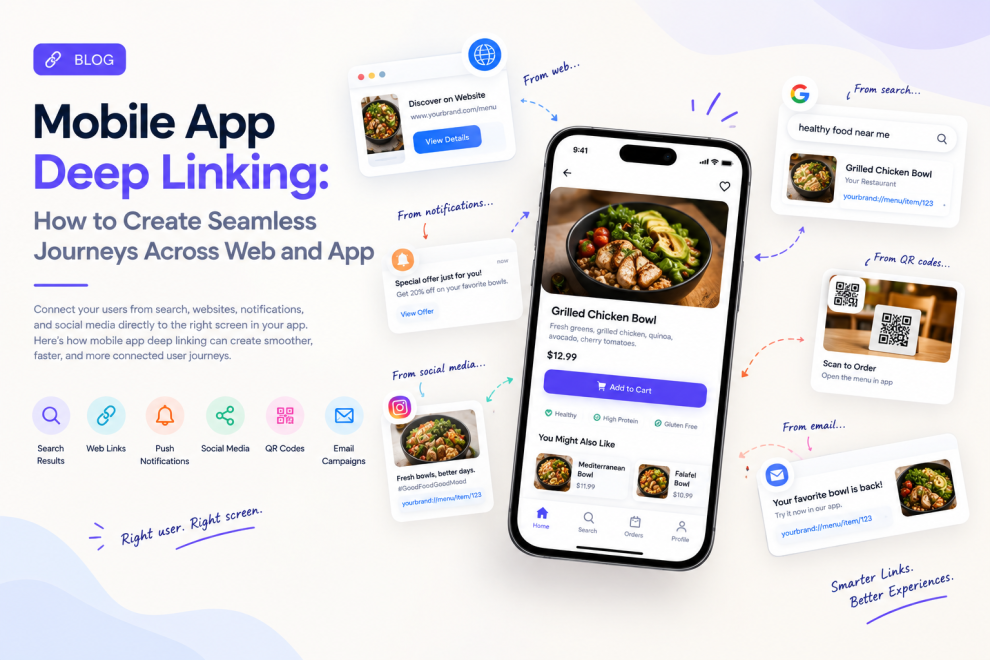
Modern mobile apps increasingly need to connect different customer touchpoints: websites, search results, emails, notifications, social posts, advertisements, QR codes, and the app itself.
Deep linking is one of the technologies that makes this possible.
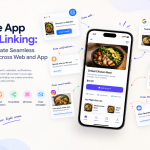
Rather than simply opening an application, a deep link can take a user directly to a specific screen, product, article, booking, order, or workflow.
As mobile experiences become more connected, deep linking is becoming less of a technical add-on and more of a product experience decision.
What Is Mobile Deep Linking?
A traditional app link might simply open the application.
A deep link goes further.
It tells the application where the user should go.
For example:
Without deep linking:
Notification → Open app → Home screen → Search → Product → Details
With deep linking:
Notification → Product details
That difference may seem small, but repeated friction across thousands of users can have a significant impact.
Deep links can connect users directly to:
- Product pages
- Restaurant menus
- Booking screens
- Offers
- Articles
- Shopping carts
- Account pages
- Order tracking
- Specific app workflows
The technology behind this can involve universal links on iOS, app links on Android, and other routing mechanisms depending on the architecture.
Why Deep Linking Matters More in 2026
Mobile applications are no longer isolated experiences.
Users move between search engines, websites, social platforms, emails, messaging applications, and native apps throughout the same journey.
At the same time, modern mobile development is increasingly focused on seamless experiences, on-device intelligence, cross-platform architecture, and connected ecosystems.
That makes routing particularly important.
If a user discovers something on the web, the application should know where that journey belongs.
If an existing customer clicks an offer, the app should not make them start again.
If a customer receives an order update, the notification should open the relevant order rather than a generic dashboard.
Deep linking helps connect those moments.
Deep Linking Should Be Designed, Not Just Implemented
One common mistake is treating deep linking entirely as an engineering task.
The URL can work perfectly while the user experience still fails.
Consider a user who opens a link to a product that has been removed.
What happens?
Or a user who opens a promotional link without being logged in?
Or someone who opens a link to content available only in certain regions?
These situations require product decisions.
A strong deep-linking strategy should define what happens when:
- The app is installed
- The app is not installed
- The user is logged out
- The destination no longer exists
- The content requires permission
- The link has expired
- The user opens the link on an unsupported device
The technical route is only one part of the experience.
The Install Journey Matters
Deep links become particularly valuable when a user does not have the application installed.
Imagine someone receives a link to a specific travel booking.
If the application is installed, the link should open the booking.
If it is not installed, the user may be directed to the appropriate app store.
But after installation, the experience should ideally preserve the original intent.
The user should not install the application and then have to search for the same booking again.
This is where deferred deep linking can become important.
The original destination can be preserved through the installation process and used once the application is opened.
That creates a much more continuous journey.
Deep Links Can Improve Notifications
Push notifications are only valuable when they take users somewhere useful.
Compare:
“Your order has been updated.”
with:
“Your order is arriving today.” → Tap → Live order tracking
The second experience has a clear destination.
Deep links allow notifications to become actionable entry points rather than simple messages.
This can be useful for:
- Order tracking
- Payment reminders
- Appointment updates
- Security alerts
- New messages
- Task assignments
- Account activity
- Personalized offers
The destination should always match the reason for the notification.
Deep Linking and Personalization
Deep links can also work with personalization.
A financial application might send different users to different experiences depending on their account status.
A retail app might take a returning customer directly to a saved product.
A healthcare application could open an upcoming appointment.
A productivity application might take a user directly to an assigned task.
The important principle is that the destination should reflect the user’s current context.
This is especially relevant as mobile applications become more intelligent and increasingly use contextual information to determine what users need. On-device AI and contextual mobile experiences are among the notable development directions being discussed for 2026.
Security Cannot Be an Afterthought
Deep links can also introduce security risks when they expose sensitive information or bypass expected authentication flows.
Applications handling financial, healthcare, enterprise, or personal data need to validate destinations and user permissions carefully.
A deep link should never become a shortcut around authorization.
Teams should consider:
- Authentication
- Authorization
- Expiring links
- Sensitive parameters
- Input validation
- Secure routing
- Permission checks
- Logging and monitoring
The application should verify that the current user is actually allowed to access the destination before displaying protected information.
Measure the Journey, Not Just the Link
Deep linking should be evaluated as part of the larger customer journey.
Useful metrics include:
- Deep-link open rate
- Successful destination rate
- App installation rate
- Post-install continuation
- Notification-to-action conversion
- Login abandonment
- Destination loading time
- Campaign conversion
- Repeat engagement
A link that receives thousands of clicks but sends users to a broken or irrelevant screen is not successful.
The real goal is simple:
Get the user from intent to action with as little friction as possible.
Building Deep Linking Into the Mobile Strategy
Deep linking works best when it is considered early in application architecture rather than added after launch.
Product, UX, engineering, marketing, and analytics teams should agree on the important destinations and journeys.
For every major user journey, teams should ask:
- Where can the user enter this journey?
- Where should the link take them?
- What happens if they are logged out?
- What happens if the app is not installed?
- What happens if the destination changes?
- How will the journey be measured?
This turns deep linking from a collection of URLs into a deliberate navigation strategy.
The App Should Meet Users Where They Are
The best mobile experiences do not force users to start from the beginning every time they interact with a brand.
They remember context.
They preserve intent.
They connect channels.
Deep linking is a relatively small technical capability, but it can influence how an entire mobile ecosystem feels.
As applications become more connected to websites, notifications, search, social channels, AI systems, and digital services, the ability to move users directly to the right experience will become increasingly important.
Companies such as GeekyAnts have worked across mobile application development and product engineering, reflecting the wider industry shift toward applications that are not just collections of screens but connected digital experiences.
The future of mobile UX is not simply about building better screens.
It is about getting users to the right screen at the right moment.



Add Comment