






Artificial intelligence is changing what people expect from mobile applications.
Traditional apps generally wait for users to tap, search, type, and navigate. Newer AI-enabled applications can understand natural language, summarize information, personalize experiences, recommend actions, and in some cases help users complete multi-step tasks.
Current 2026 mobile development discussions increasingly focus on AI-native apps, on-device AI, agentic capabilities, personalization, privacy, and intelligent automation rather than simply adding a chatbot to an existing application.
But AI should not be added simply because it is popular.
The useful question is:
What problem can AI solve better than the existing experience?
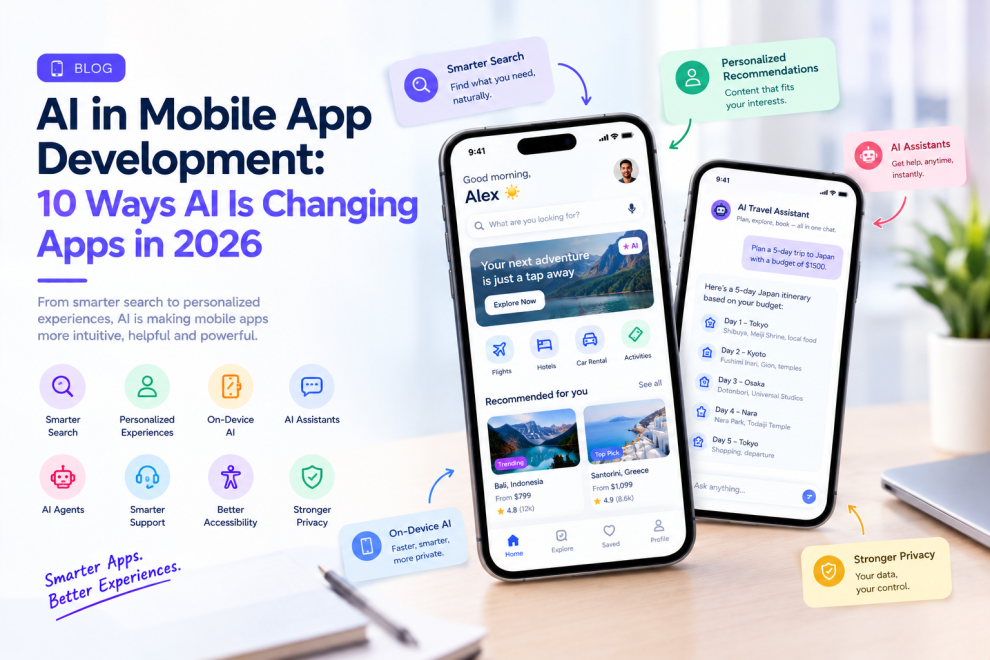
1. AI Is Making Search More Natural
Traditional app search expects users to enter keywords.
AI can allow users to describe what they want naturally.
Instead of searching through several filters, a customer could type:
“Show me black running shoes under $100.”
An AI-powered search experience can interpret the intent and return relevant products.
This approach can reduce the effort required to navigate large amounts of information.
2. AI Can Personalize the App Experience
Different users may have very different needs.
AI can analyze relevant behavior and context to personalize recommendations, content, products, notifications, or frequently used actions.
For example, a travel application could surface destinations based on previous searches, while a shopping application could prioritize products related to a user’s interests.
Personalization should remain transparent and useful rather than becoming an excuse to collect unnecessary information.
3. On-Device AI Is Becoming More Practical
One important 2026 shift is the growing use of AI processing directly on mobile devices.
On-device AI can be useful when applications need lower latency, offline functionality, or greater privacy. Current mobile platforms are expanding developer access to on-device intelligence, making local AI more practical for selected use cases.
Potential examples include:
- Text summarization
- Smart replies
- Image processing
- Speech-related features
- Classification
- Offline assistance
Not every AI feature needs to run locally.
Many applications will use a hybrid approach where lightweight tasks happen on the device while more demanding reasoning uses cloud infrastructure.
4. AI Assistants Can Become Part of the App
AI assistants are moving beyond simple question-and-answer interfaces.
An assistant inside an application could help users find information, explain account activity, create content, summarize records, or guide them through a workflow.
For example, a business application could allow a manager to ask:
“Show me this week’s delayed orders.”
Instead of navigating through multiple dashboards, the assistant could retrieve the relevant information.
The value comes from reducing unnecessary navigation.
5. AI Agents Can Help Complete Tasks
Agentic mobile experiences go one step further.
Instead of only providing information, an AI system can potentially perform approved actions using application tools and APIs.
Examples could include scheduling an appointment, preparing an order, creating a support request, or organizing information.
However, high-impact actions require careful permissions, confirmation, monitoring, and auditability.
AI should not automatically perform sensitive actions simply because it can.
6. AI Can Improve Customer Support
Mobile applications can use AI to handle common support questions and guide customers toward solutions.
Instead of forcing users to search through a large help center, an AI assistant can interpret a question and surface relevant information.
For complex issues, the system can collect context before handing the case to a human support representative.
This can reduce repetitive work while giving users faster access to basic assistance.
7. AI Can Make Accessibility Better
AI can also improve how people interact with applications.
Potential use cases include speech interaction, image descriptions, text simplification, transcription, language assistance, and personalized interfaces.
Accessibility should not be treated as an optional AI feature, however.
Core accessibility principles still need to be built into the product experience.
8. AI Changes Mobile App Architecture
Adding AI is not only a UI decision.
A production AI feature may require:
- Model APIs or on-device models
- Data pipelines
- Authentication
- Permission systems
- Monitoring
- Prompt and model management
- Secure API integration
- Evaluation
- Fallback behavior
This means AI features should be considered during product and architecture planning.
Simply placing an AI API behind a button does not automatically create an AI-powered product.
9. Privacy Becomes More Important
AI applications can process highly sensitive information.
Depending on the product, this might include conversations, financial information, health-related information, location data, documents, images, or personal preferences.
Teams need to determine what information is collected, where it is processed, how long it is retained, and which systems can access it.
On-device processing can be useful for some privacy-sensitive scenarios, but it is not a universal solution.
Security and privacy decisions should be made according to the actual data and use case.
10. AI Should Be Measured by User Outcomes
An AI feature can look impressive during a product demonstration and still provide little value in production.
Teams should measure what the feature actually improves.
Useful metrics may include:
- Task completion time
- Search success
- Support resolution
- Conversion
- Retention
- User satisfaction
- Error rates
- AI response quality
The goal is not to maximize the number of AI features.
It is to reduce effort or improve outcomes.
Should Every Mobile App Add AI?
No.
AI makes sense when it solves a genuine product problem.
A calculator app does not necessarily need an AI assistant. A financial application may benefit from transaction explanations or intelligent budgeting. A healthcare application may benefit from summarization or navigation assistance, provided privacy and regulatory requirements are properly addressed.
The technology should follow the user need.
How Businesses Can Start With AI
A practical approach is to identify one high-value workflow.
For example:
Problem: Customers spend too much time searching for products.
AI opportunity: Natural-language product search.
Or:
Problem: Employees spend hours finding information across dashboards.
AI opportunity: An assistant that retrieves approved business data.
Start with a measurable problem, build a controlled experience, evaluate the results, and expand only when the value is demonstrated.
AI Is Changing the Definition of a Mobile App
The biggest shift may not be the addition of AI features.
It is the move from applications that simply display information to applications that can increasingly understand context and help users act.
Current 2026 mobile-development research points toward AI-native experiences, on-device intelligence, adaptive interfaces, and more mature cross-platform architectures.
Companies such as GeekyAnts work across mobile product engineering and AI-enabled product development, bringing together application architecture, UX, integrations, and AI capabilities rather than treating AI as an isolated feature.
The strongest mobile applications will not necessarily be those with the most AI.
They will be the ones where AI makes a specific customer journey faster, easier, more useful, or more personalized.




Add Comment