







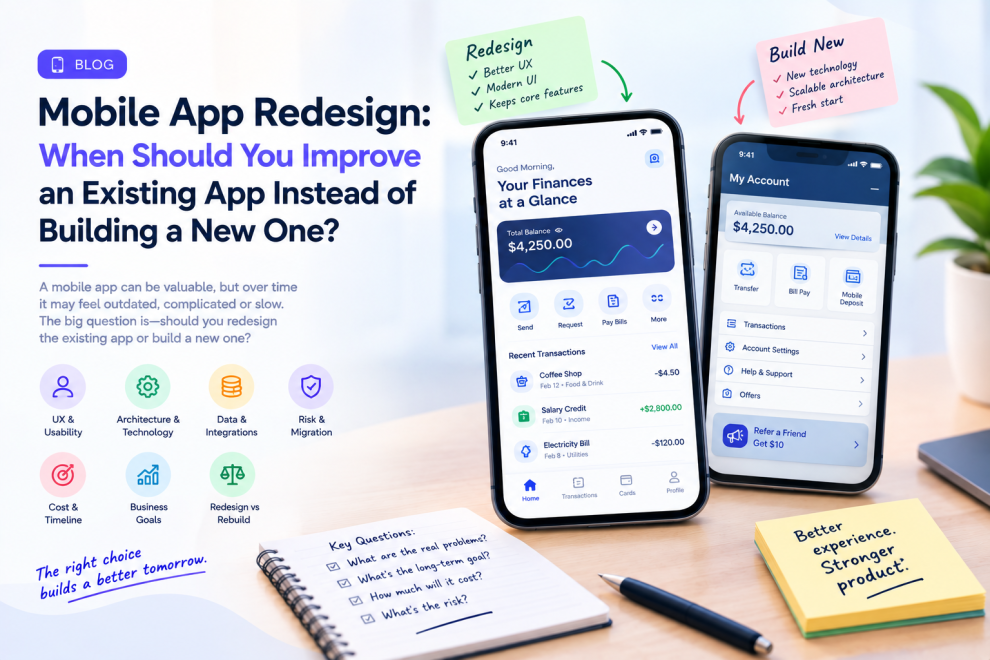

When a mobile app starts showing problems, teams often face the same question:
Should we redesign the existing app or build a new one?
The answer is rarely as simple as choosing the cheaper option.
An existing application may contain years of customer data, business logic, integrations, and proven workflows. At the same time, its architecture may be difficult to maintain, its interface may feel outdated, and new features may take too long to release.
A complete rebuild can solve some of those problems—but it can also introduce new risks.
A redesign, meanwhile, can improve the experience without throwing away everything that already works.
The right decision depends on what is actually broken.
What Is the Difference Between a Redesign and a Rebuild?
A redesign primarily changes how an existing product looks, feels, and works from the user’s perspective.
It may involve navigation, information architecture, visual design, interaction patterns, onboarding, accessibility, or individual workflows.
A rebuild goes deeper.
It can involve replacing the underlying architecture, technology stack, backend services, APIs, or development approach.
The two can happen together, but they do not have to.
A company may completely redesign its mobile experience while keeping much of the existing backend.
Another may rebuild the technical foundation while keeping familiar parts of the interface.
Signs Your Mobile App Needs a Redesign
An outdated visual style alone is not enough reason to rebuild an application.
However, several signs suggest the user experience needs serious attention.
Users may struggle to find important features. Navigation may have become complicated. Core workflows may require too many steps. New functionality may feel disconnected from older screens. Accessibility problems may have accumulated.
App-store reviews can also provide useful clues.
Repeated comments about confusing navigation, difficult checkout, poor readability, or frustrating workflows indicate that users are experiencing problems that cosmetic changes will not solve.
Signs the Problem Goes Beyond UX
Sometimes the interface is not the main problem.
An app may take too long to release because the codebase is difficult to modify. A small feature may require changes across several tightly connected systems. APIs may be outdated. Third-party dependencies may no longer be supported.
Crashes and performance problems may also originate from deeper architectural issues.
In these situations, a visual redesign alone may provide temporary improvement without solving the underlying technical constraints.
This is where teams need to distinguish UX problems from product engineering problems.
Five Questions to Ask Before Choosing a Rebuild
- Can the current architecture support the product roadmap?
If the foundation cannot support planned capabilities, continuing to patch it may become increasingly expensive. - Are users struggling with the experience or the technology?
Confusing workflows can often be redesigned without replacing the entire application. - How much existing functionality still works well?
A complete rebuild may unnecessarily replace stable and valuable components. - How risky would migration be?
Existing users, data, integrations, authentication, payments, and backend systems all need consideration. - What is the business trying to achieve?
A new visual identity requires a different approach from preparing the product for a completely new operating model.
Why Rebuilding Everything Can Be Risky
A rebuild can look attractive because it offers a clean starting point.
But the old application contains knowledge that may not be documented.
Developers discover edge cases through years of maintenance. Customer-support teams understand unusual workflows. Users may depend on features that product teams rarely discuss.
A new application can accidentally remove those behaviors.
There is also a migration challenge.
Users may need to update the app, existing sessions may need to be transferred, data structures may change, and integrations must continue working.
A rebuild should therefore not be treated as an opportunity to simply recreate the old product with newer technology.
It should have a clear reason.
When a Redesign Makes More Sense
A redesign is often appropriate when the underlying product is still valuable but the experience has become difficult to use.
For example, an application may have:
- outdated navigation
- inconsistent UI patterns
- confusing workflows
- poor mobile accessibility
- weak information hierarchy
- unnecessary steps
- an interface that no longer reflects current user needs
In these cases, improving the experience may deliver significant value without replacing the entire technical foundation.
Consider a Gradual Redesign
Teams do not always need to redesign every screen at once.
A phased approach can reduce risk.
Start with the most important journey—perhaps onboarding, checkout, search, account management, or appointment booking.
Study how users interact with it.
Redesign the workflow, test it, measure the results, and then move to the next area.
This allows the team to learn before making broader changes.
It also gives engineering teams an opportunity to modernize supporting components incrementally.
Do Not Forget the Backend
A mobile redesign can expose backend limitations.
A new interface may require faster APIs, better search, additional data, real-time updates, stronger authentication, or improved integrations.
This is why mobile redesign should involve both design and engineering from the beginning.
The screen is only the visible part of the product.
Behind it are APIs, databases, authentication, analytics, notifications, integrations, infrastructure, and business logic.
A redesign that ignores these dependencies can create beautiful screens that are difficult to deliver reliably.
Measure the Redesign After Launch
A redesign should have measurable goals.
Depending on the application, teams might monitor task completion, conversion, onboarding completion, search usage, checkout abandonment, support requests, crash rates, or user satisfaction.
The goal is not simply to make the application look newer.
It is to make the product easier and more effective to use.
If users can complete important tasks faster and with fewer errors, the redesign has created measurable value.
When a Rebuild Is the Better Choice
A rebuild becomes more compelling when the existing technology actively prevents the product from moving forward.
This might happen when the architecture cannot scale, critical dependencies are obsolete, security requirements cannot be met efficiently, development has become excessively slow, or the application needs capabilities that the current foundation cannot realistically support.
Even then, teams should avoid rebuilding everything automatically.
A better approach is to identify what should be kept, replaced, migrated, or retired.
Companies such as GeekyAnts work across mobile product engineering, UX, architecture, and modernization, which reflects the reality that a successful app refresh often requires decisions across both the visible product experience and the underlying technology.
The Best Mobile App Is Not Always the Newest One
A new application is not automatically better.
Sometimes the right answer is a focused redesign. Sometimes it is incremental modernization. Sometimes a complete rebuild is justified.
The important decision is understanding why the existing product is struggling before deciding how much of it needs to change.
If users are frustrated but the foundation remains solid, redesign the experience.
If the technology is blocking the product itself, consider a rebuild.
And when both are problems, treat the redesign and modernization as connected parts of the same product strategy.




Add Comment